Online Advertising for Small Businesses: A Beginner’s Guide
December 4th, 2025
Online ads help hands-on local businesses (plumbers, electricians, gardeners, hairdressers, physios, vets, coaches/consultants) get more calls, bookings, and foot traffic. This guide explains what digital ads are, how they work, where to run them, what they cost, and how to avoid common money-wasting mistakes—so you can start small and grow safely.
This article was created with guidance from three senior advertising experts:
- Viktorie Peterova (Digital Strategy & Performance Consultant)
- Zbynek Hyrak (Web Analytics & PPC Specialist)
- Matej Kusy (Search Advertising Manager)
These consultants bring you practical insights and free, field-tested tips for small businesses.
BONUS: 90‑day plan you can actually follow for free.
You will learn:
- Paid Marketing Data for Small and Midsize Businesses
- What Is Digital Advertising
- Advantages and disadvantages of online advertising
- Jargon Buster: The Only Ad Terms You Need to Know
- How Paid Ads Work
- Where You Can Advertise Online in 2026
- Which Advertising Platform is The Best for my Business
- Measure & Evaluate Before You Spend More
- 10 Most Common Paid Mistakes & How To Fix Them
- How Much Online Advertising Costs a Small Business
- A 90‑Day Advertising Playbook
Paid Marketing Data for Small and Midsize Businesses
According to BIA, in U.S. local advertising, digital passes 50% in 2025: ~$89B digital vs ~$82B traditional. Your customers are increasingly reached on local digital channels.
U.S. internet ad revenue hit $258.6B in 2024 (+14.9% YoY); search ads alone reached $102.9B—proof that people look online when they need help.
9 out of 10 small businesses maintained or increased their advertising spend in 2025—51% increased, 41% maintained.
What Is Digital Advertising
Digital ads mean paying to show a short message to people who are looking for a service (e.g., on Google/Maps) or who are scrolling (e.g., on Facebook, Instagram, YouTube, TikTok). The goal isn’t “clicks.” The goal is a call, booking, or visit.
For small businesses, good advertising does three things in this order:
- Be findable (show up where people look),
- Be credible (proof you’re legit: reviews, photos, licenses),
- Be contactable (one‑tap call or booking).
Want to build trust alongside ads? Learn to optimize your website yourself so both users and robots can understand it and like it.
Advantages and disadvantages of online advertising
In short: The benefits are precise local reach, flexible budgets you can pause, and measurable results.
The downsides are rising costs in competitive areas, people ignoring ads, and wasted clicks if your page isn’t fast and trustworthy.
Pros (why small businesses use it)
➕ Reach people who are already looking in your area (Search/Maps).
➕ Start small with a daily cap; pause anytime.
➕ Measure real outcomes (calls/bookings), not guesses.
➕ Many formats fit any trade (text, images, short video, lead forms).
Cons (and how to reduce them)
➖ Ad‑blindness/ad‑blocking: lead with helpful offers and fast pages.
➖ Limited space: use the 4 P’s Problem → Promise → Proof → Proposal for persuasive writing.
➖ Creeping costs: do a weekly 15‑minute check and add negative keywords.
➖ Interruptive formats: keep it local, useful, appointment‑friendly.
Jargon Buster: The Only Ad Terms You Need to Know
Before we deep dive into the topic, here is a short and practical list of paid marketing terminology. Just enough to read reports, make decisions or speak with external providers about your campaigns.
- PPC = pay per click
- SEA = search engine advertising
- Conversion = a booking, call, form, or sale.
- CPA = cost per acquisition
- CPC (cost per click) = you pay when someone clicks.
- CPM (cost per thousand views) = you pay for views; good for awareness/video.
- CPL (cost per lead) = you pay when a lead arrives (call/message/form).
- CTR (click‑through rate) = % of people who clicked.
- ROAS = revenue ÷ ad cost; CAC = all‑in cost to win one new customer.
- Negative keywords = words you exclude (e.g., jobs, DIY, free, parts).
- Radius/ZIP targeting = show ads only where you actually serve.
- Retargeting (or remarketing) = follow up with visitors who didn’t book.
- Lead forms (in‑platform) = quick quote forms inside FB/IG/LinkedIn.
- Landing / “money” page = a simple page built to convert (call/book), the page people land on after clicking your ad.
- LSA = Local Service Ads
- PPL = pay‑per‑lead ads in eligible trades.
- UTM tags = short labels on links so analytics can trace results.
- Impressions = number of times your ad was shown (not clicks).
- Conversion rate (CVR/CR) = % of people who completed your main action (call, form, booking).
- Smart Bidding = Google’s automated bidding that adjusts bids based on conversion likelihood.
Engagement = user interaction with your ads or site (clicks, video views, form starts, etc.). - Frequency = average number of times your ad was shown to the same person.
- Reach = number of unique people who saw your ad at least once.
- Attribution = how credit for a conversion is assigned across ads or channels.
How Paid Ads Work
- You choose search words (e.g., “water heater repair”) or a local audience (ZIP codes, interests).
- You set a daily cap so you never overspend.
- The platform shows your ad; you pay per click (CPC) or per lead (CPL), depending on the format.
- You count bookings/calls each week and adjust slowly.
Intent vs. Attention (mental model)
- Intent ads (Search/Maps): people already want help (“plumber near me”, “urgent vet”).
- Attention ads (Social/Video): people are browsing; you earn attention with before/after, short clips, and simple offers.

Need a money page that turns ad clicks into bookings?
Describe your project and create your website in our AI builder for free.
Where You Can Advertise Online in 2026
Short lead-in: You don’t have to be everywhere. Pick one primary channel that fits how customers hire you; add a second later for follow-up.
Search & Maps (Google, Microsoft Bing)
- Best for: urgent, “I need help now” jobs (plumber, electrician, physio pain, “vet near me”).
- Show: today/soon availability, “from” prices, service radius, 3 short reviews, license/insurance where relevant.
- Starter setup: radius/ZIP targeting, exact job keywords, and negative keywords (jobs, DIY, free, parts).
- Also consider: Local Services Ads (LSA) where eligible.
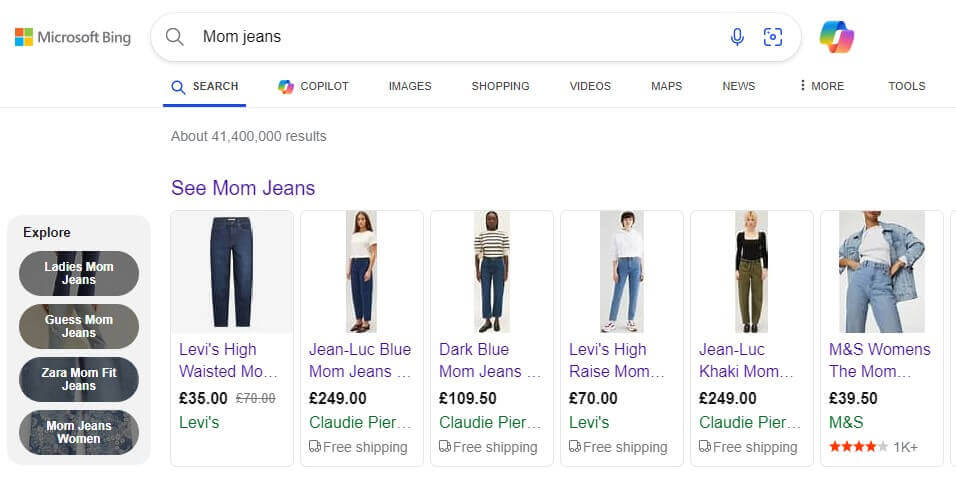
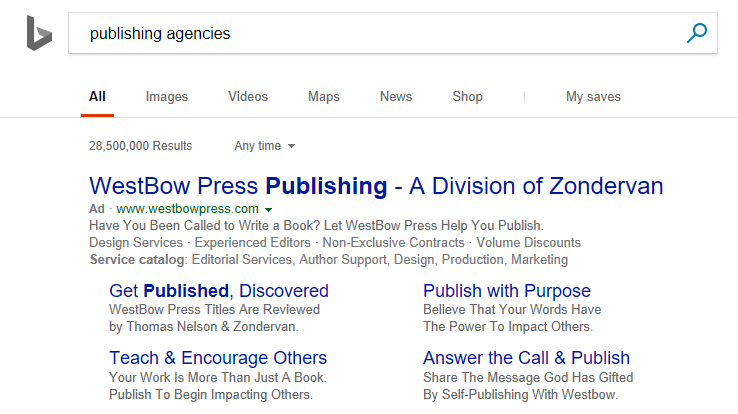
Search Ad Examples:
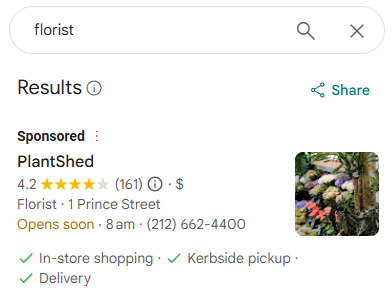
Google Search Examples:
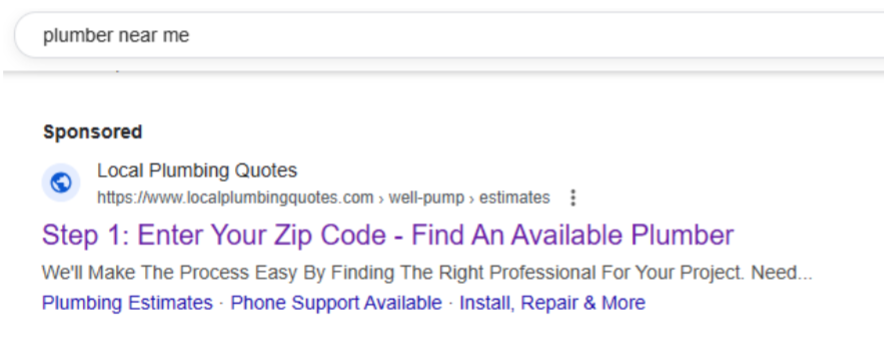
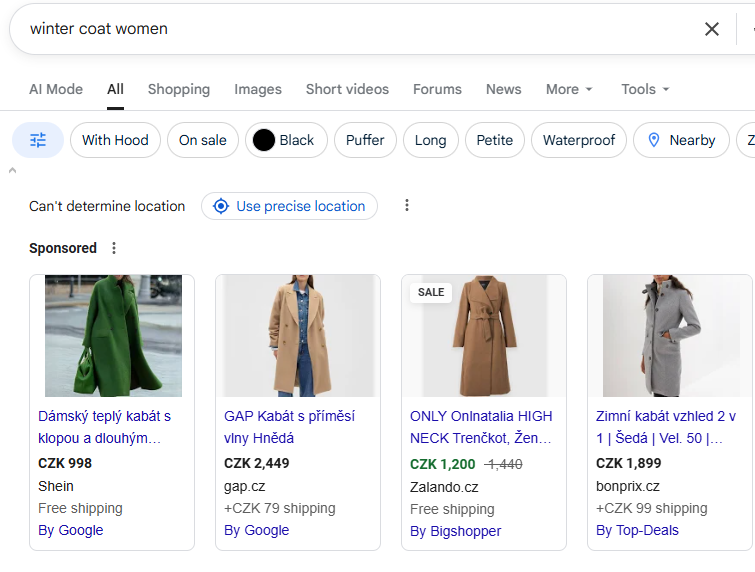
Bing Search Ads Examples:
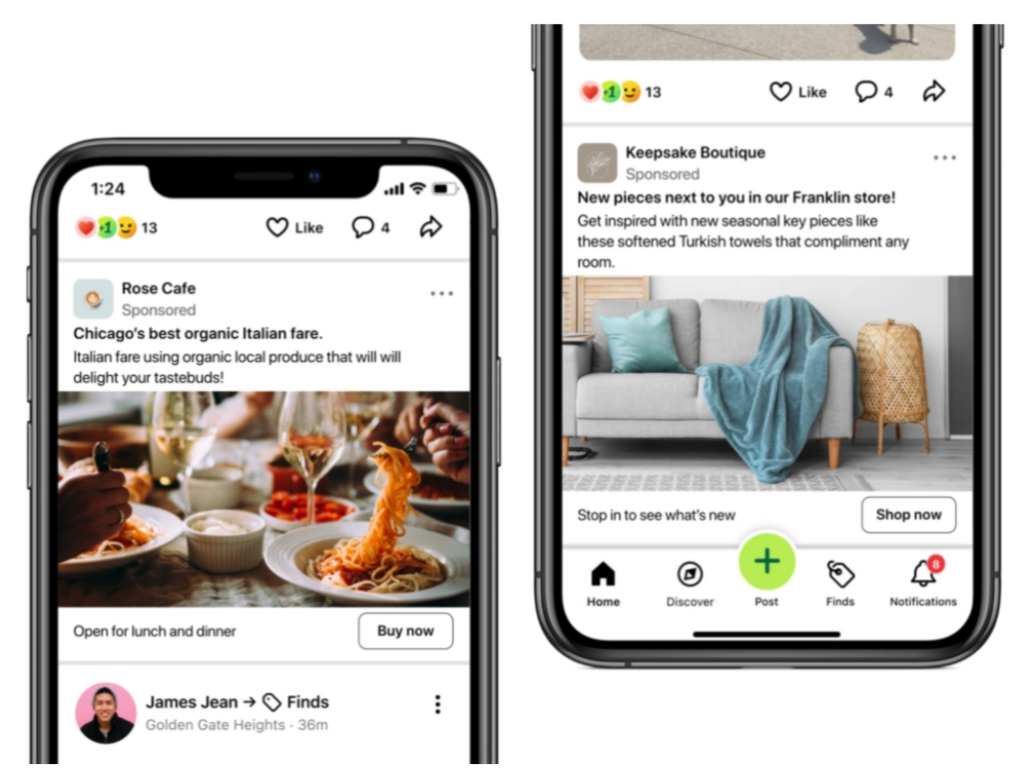
Social Media (Facebook, Instagram, TikTok, LinkedIn)
- Best for: visual or seasonal work (hair/beauty, gardens, pet care) and relationship‑led offers (coaches/consultants).
- Show: before/after photos, 15–30s reels, off‑peak promos, “Book via DM.”
- Starter setup: target nearby ZIPs + age; run 2–3 simple creatives; test a lead form for quick quotes.
Integrate social media on your website and boost your online presence success.
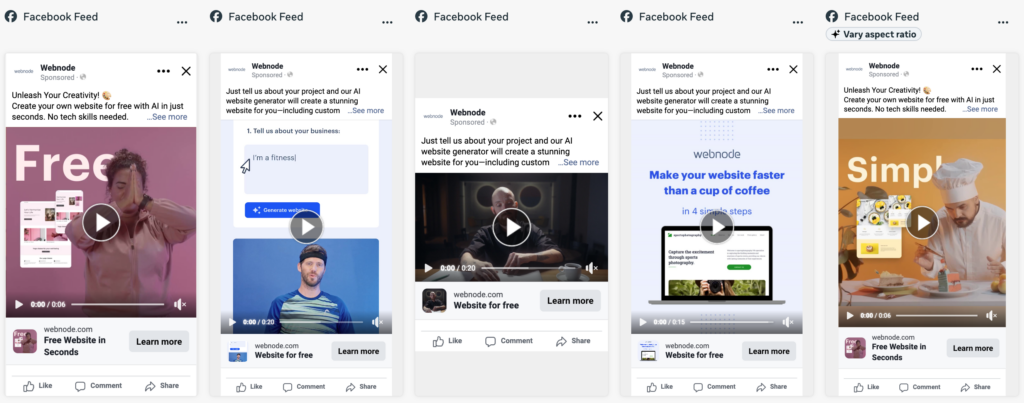
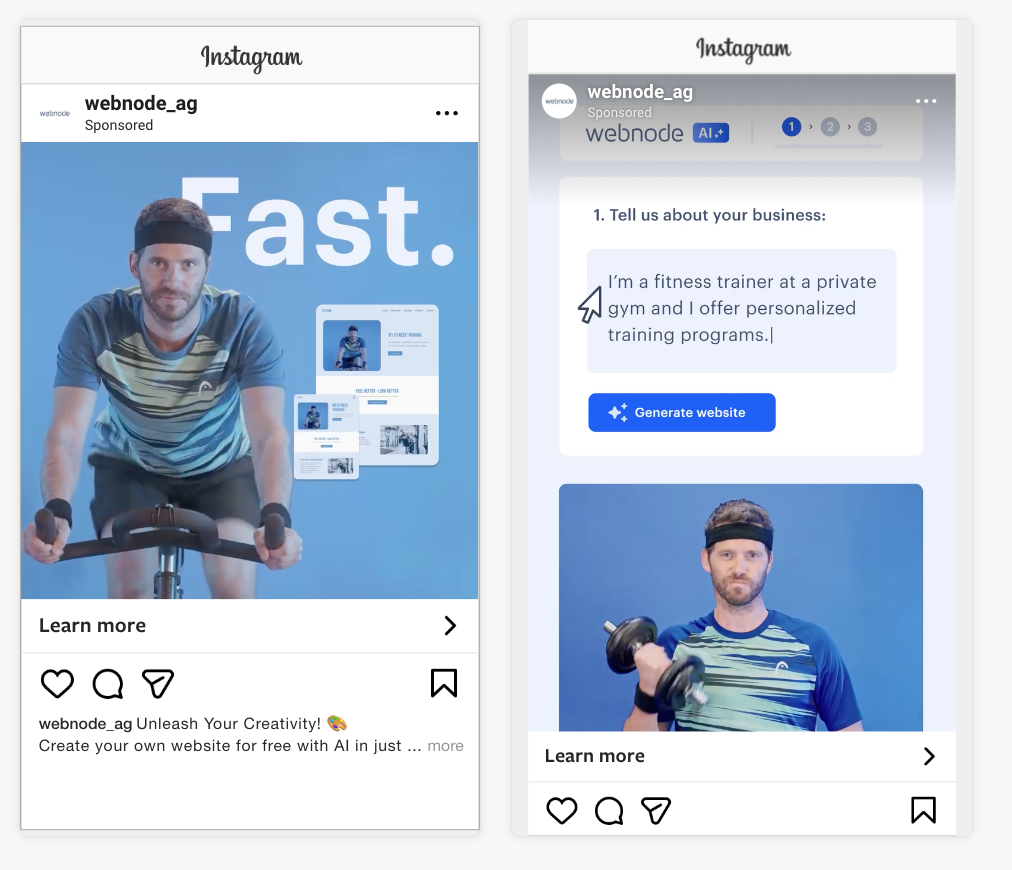
Social Ads Examples:
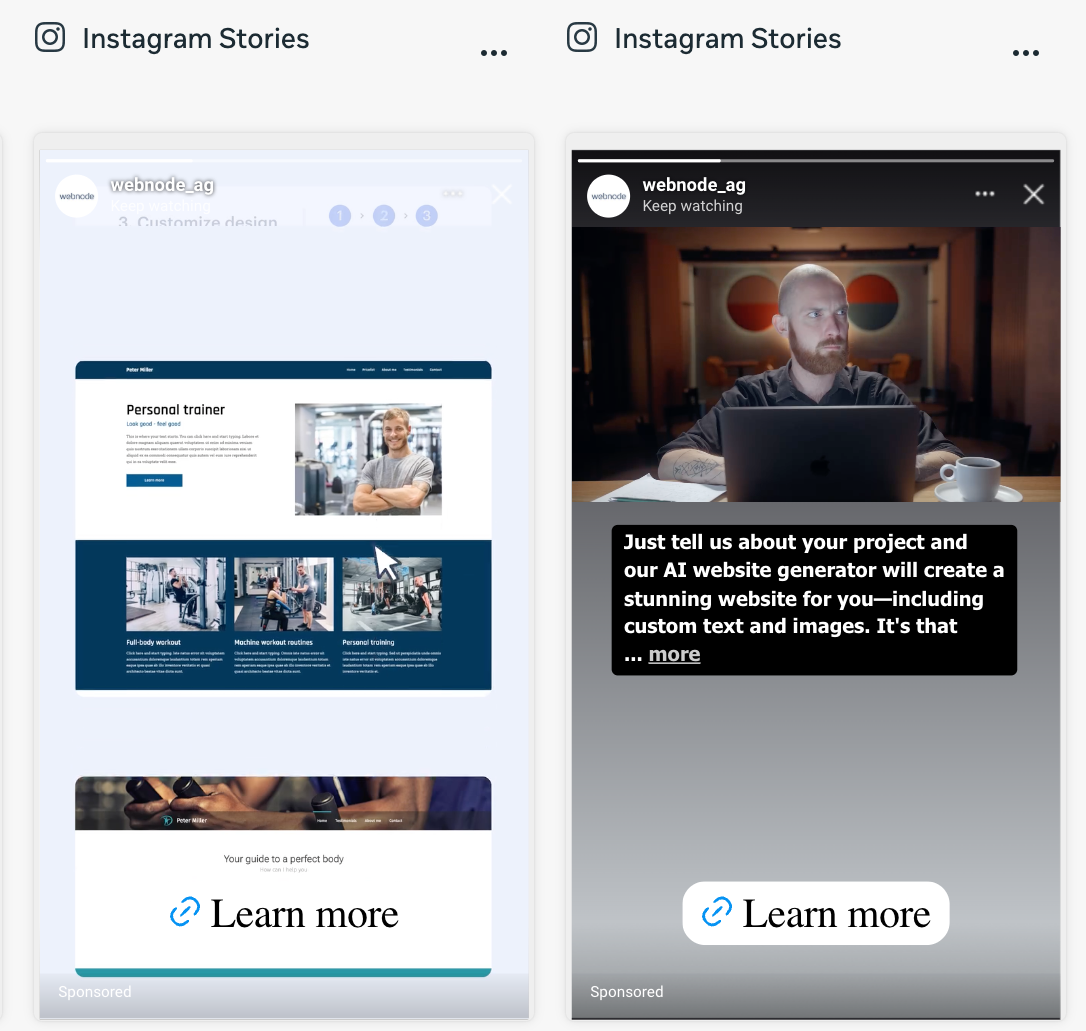
Video (YouTube Shorts, Reels, TikTok)
- Best for: proof and trust.
- Show: the result first (0–3s), then your promise + “Book now.”
- Also Consider: Keep videos 15–30s.
Wanna start recording? Learn how to use video in your marketing strategy.
Video Ads Examples:
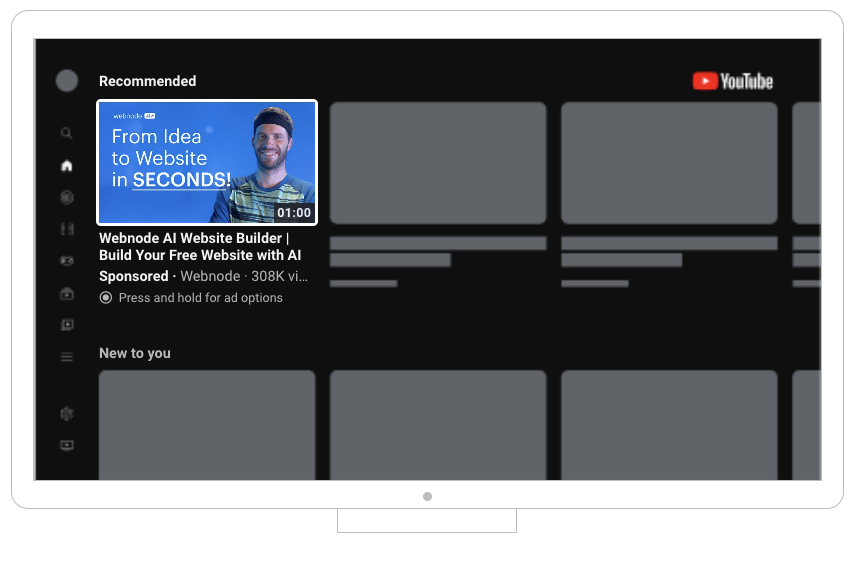
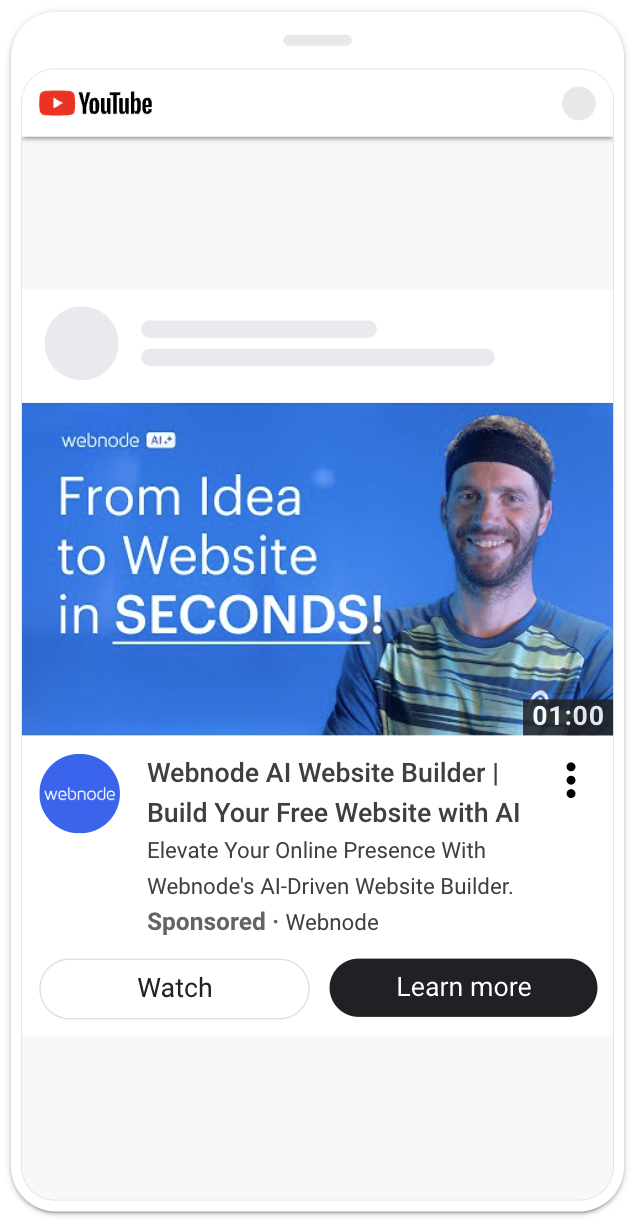
Display / Other Websites
- Best for: gentle reminders to people who already visited your site.
- Show: the service they viewed + a nudge (review + “from” price + button).
- Starter setup: retargeting before broad display.
Display Media Ads Example:
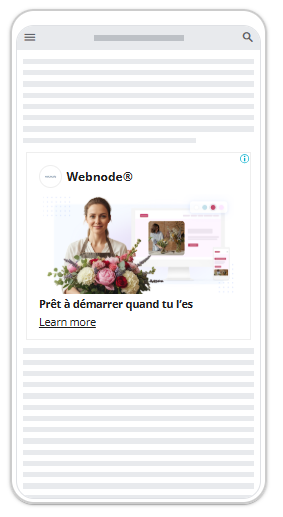
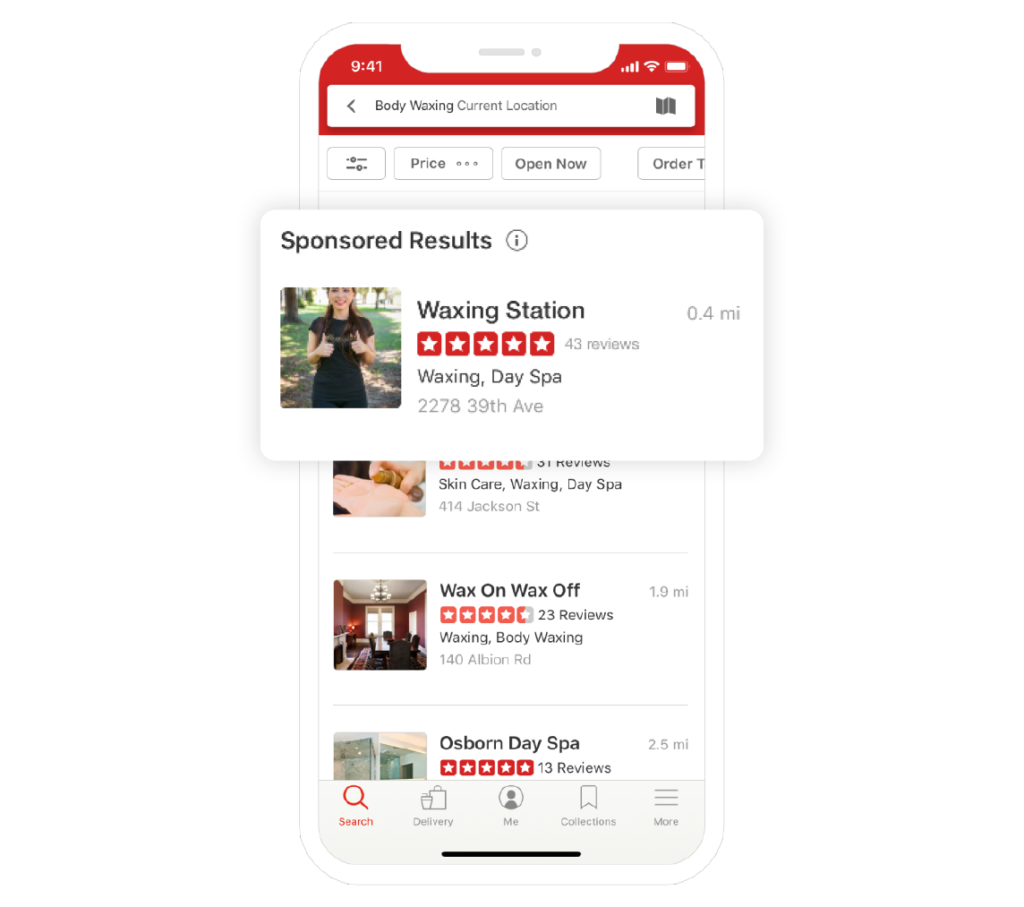
Local & Review Platforms (Nextdoor, Yelp, …)
- Best for: neighborhood trust and review‑sensitive categories (vets, trades,..).
- Starter setup: Claim your profile, add fresh photos, test local deals once you have strong recent reviews.
Local Platform Ads Examples:
Email (two practical angles)
- Paid placements in local newsletters: good for seasonal packages (spring cleanups, holiday styling).
- Your own list (owned): best for repeat business and referrals (reminders, check‑ups, bundles). Collect emails after every job and send one short monthly note with a single offer.
Ads Cheat Sheet: Channel Overview
| Channel | Best for | What to show | Pay model | Starter daily cap* |
| Search/Maps | Urgent jobs | Today/soon availability, from prices, reviews | CPC / CPL (LSA) | $10–$30 city; $5–$15 town |
| Social | Visual/seasonal | Before/after, promo, DM/booking | CPC / CPM | $10–$30 |
| Video | Proof/trust | 15–30s result‑first | CPM / CPC | $10–$20 |
| Display (retarget) | Reminders | Service viewed + review | CPM / CPC | $5–$10 |
| Local/Review | Nearby trust | Rating + from prices | CPC / lead / deal fee | $5–$15 (test) |
| Repeat/referrals | One clear offer | Owned / flat | $— / varies |
Which Advertising Platform is The Best for my Business
In 2025, small businesses said their top channels were social media (75%), product referrals (57%), and search engine advertising (51%)—so start where customers already spend attention and trust.
Not sure where to start? Use this as a quick hint, not a hard rule—what works varies by town, competition, and season. Start small, judge by booked jobs (not clicks), and if you’re unsure, have a professional set it up or sanity-check your plan.
| Situation | Who this fits (examples) | Start here | Show this |
| Emergency | Plumber, electrician, HVAC, locksmith, boiler/no-heat, dental emergency, urgent vet | Google Search & Google Maps | Today/tonight, big phone button, from $X, service area |
| Show Your Work | Hairdresser/barber/colorist, landscaper/gardener, house cleaning, painting/remodeling, pet grooming | Facebook / Instagram / TikTok (short video) | Before/after, from $X, Book now, quick DM |
| Build Trust | Physiotherapist/chiropractor, vet, dentist, childcare/tutor, home inspector, accountant, coach/consultant | Google Search & Maps + Reviews | 3 reviews, license/insurance, hours, from $X |
Hints aren’t one-size-fits-all. On a tight budget, use them as a starting point—then test, learn, and adapt to what brings bookings.
Measure & Evaluate Before You Spend More
Judge your ads by booked jobs (calls/appointments), not clicks. In every platform, mark a conversion as the action that leads to revenue (call, form, booking).
Set Up The Right Tracking for Ad Channels
Google Search / Maps
Turn on call conversion tracking (counts a call as a conversion after a minimum duration you choose), and track calls from call ads/location assets.
Google Local Service Ads (LSA)
Leads are built-in—you pay per valid lead and can view/dispute charges in the LSA dashboard.
Facebook / Instagram
Pick a clear result (e.g., Leads/Messages) and watch the cost per result in the Ads Manager.
Analytics (Google Analytics, Matomo, …)
Always add UTM tags to every ad link so you can see which campaigns drove calls/forms in your analytics acquisition reports.
Use UTMs only on external links pointing to your site—not on links inside your own site—so you don’t overwrite where visitors actually came from.
If you can’t answer how many bookings/calls your ads generated last week, pause expansions until tracking is fixed.
“If your website is in the EU or you target people in the EU (even from the U.S. or another country), you must show a cookie/consent banner so visitors can choose whether to allow analytics and marketing cookies. Use plain language and clear buttons—that’s what drives more opt-ins.”
Zbynek Hyrak – Web Analytics & PPC Specialist

How AI spends your Ad Budget (2025 update)
AI loves good data. Google/Meta now use AI to decide who sees your ad and how much to bid—in real time (called auction-time bidding). If your account tracks the wrong conversions (e.g., page views instead of calls/bookings), the system learns the wrong thing and shows your ads to the wrong people.
How it works (simple example)
- A student searches on Friday at 10:30 pm for “apartment cleaning.” Low chance to book now → the system bids low.
- An office manager searches on Wednesday at 10:00 am for “office cleaning near me.” High chance to book → the system bids higher.
Same keyword, different person/moment—AI adjusts the bid per search based on signals like location, time, device, past behavior.
Your 20-minute Weekly Ad Performance Check
Look at these five in this order:
- Bookings/Calls from ads (the money metric).
- CPL (cost per lead/booking) = ad spend ÷ leads.
- Answer rate on ad calls (don’t pay for missed calls).
- Top search terms / best audiences (keep winners; add negative keywords to the rest; add strong queries as exact/phrase keywords).
- Landing-page speed/bounce (If your booking page takes around 3 seconds to show, about one-third more people give up and leave—so a slow page costs you calls).
- Engagement by source/campaign — see where people stay, click, and book; cut or fix spend where visitors bounce early.
Banner: Create a fast “money page” with Webnode—no code needed. Pick a template
Keep, fix or pause
| What you’re seeing | What it means | Do this next |
| CPL on target & calls answered | Ads are paying off | Keep & increase budget +10–20% next week |
| Clicks up, leads low | Page/offer not converting | Put Call/Book first, add “from” prices & 3 reviews; speed up mobile |
| Good leads, low answer rate | Lost revenue on the phone | Limit ad hours to times you answer; add message/DM backup |
| Search terms off | Paying for the wrong clicks | Add negative keywords (jobs, DIY, free, parts); tighten radius/ZIPs |
| LSA leads inconsistent | Paying for junk leads and never tightening targeting. | Review “Leads” vs “Charged leads”; dispute invalid ones in LSA (Google Help). Also tighten your job types, service area, and hours to reduce junk. |
| Few impressions and few clicks | Your budget, bids, or targeting are too limited. | Increase your daily budget by 10–20% or broaden your targeting area (more ZIP codes or a wider radius). |
| Many impressions but low CTR | Your ads are showing, but people aren’t engaging. | Refresh visuals or headlines. Test a new offer or a short video. |
| Calls or messages after working hours | You’re paying for leads you can’t respond to. | Schedule ads to run only during business hours, or set up an automatic reply message. |
| Good results but costs rising fast | Competition has increased or it’s a seasonal spike. | Keep your budget steady for at least a week and compare conversion costs before making changes. |
| Stable results but no growth | Ads are performing, but the system is still learning. | Avoid adding new campaigns until you see a consistent upward trend for 3–4 weeks. |
Bottom line: measure booked jobs, keep what earns them, fix what slows them (page speed, reviews, answer rate), and pause what doesn’t. Once you can predictably turn spending into bookings, then talk about raising the budget.
Learn to read and understand data with our analytics guide.
10 Most Common Paid Mistakes & How To Fix Them
Most small businesses make the same paid ads mistakes — not because the tools are hard, but because they skip the setup.
Below are the most common issues we see when helping small companies fix their ad accounts and how to solve them before wasting budget.
| Mistake | Why it hurts | Quick fix |
| Out-of-area clicks because of the default location option | Google’s default “Presence or interest” can show your ads to people outside your service area if they’ve shown interest in it. | Switch to Presence only and use location exclusions for neighborhoods you don’t serve. |
| Letting Broad Match run wild | Broad match can pull in lots of loosely related searches that waste budget. | Start with Phrase/Exact (or explicitly turn off Broad Match at the campaign level). If you do test Broad Match, pair it with Smart Bidding and strong negatives. |
| Skipping the Search Terms report | You pay for irrelevant queries and never block them. | Check search terms weekly and add bad terms as negative keywords (e.g., jobs/DIY/parts). |
| No ad assets (extensions) | Your ad looks smaller and gets fewer clicks/calls. | Add sitelinks, callouts, structured snippets, image assets—Google shows them when they’re predicted to improve performance. |
| Calls not tracked properly | You can’t see which ads drove real phone calls. | Turn on call conversion tracking and set a minimum call length (e.g., 30–60s) so short misdials don’t count. |
| Counting lead conversions the wrong way | Duplicated form submissions or repeat actions inflate your results. | For lead-gen, set Count = One (track one conversion per ad click). Use Every only for true sales. |
| Tracking the wrong goals | Many businesses count clicks on “More info” buttons or homepage visits as conversions, even though no real sale or inquiry happened. | Track only meaningful actions — form submissions, purchases, or phone calls. |
| Ads leading to poor landing pages | Even the best campaign fails if people land on a page with no clear offer, confusing content, or missing call to action. | Each campaign should lead to a focused page with one clear message, key benefits, and a visible call to action. |
| Too many campaigns, too little data | Small accounts often spread their budget across too many campaigns, and none of them collects enough data to perform well. | Start with one or two main campaigns — your core service and remarketing. Expand only once you collect enough data. |
| Not excluding irrelevant audiences | Many advertisers forget to exclude audiences that will never convert — such as competitors, students looking for jobs, or users from other regions. | Regularly review search terms and exclude irrelevant keywords or audiences. |
“Most small businesses watch clicks and impressions instead of the only numbers that matter—calls, bookings, and sales. Measure those first; if you don’t send the ad platform real conversions, it can’t learn who to show your ads to. Most campaigns don’t fail from lack of budget, but from lack of attention.”
Viktorie Peterova — Digital Strategy & Performance Consultant

How Much Online Advertising Costs a Small Business
Starter caps: small towns $5–$15/day, cities $10–$30/day for one core campaign. Scale slowly.
What drives cost: local competition, urgency, reviews, page speed, hours answered.
Benchmarks (directional; vary by trade and city):
- Average Google Ads conversion rate ~7–8% (Wordstream, 2025).
- Average Cost-per-Click for Google and Microsoft Ads ~$5.26 across industries (Search Engine Journal, 2025)
- Average cost per lead ~$70 across industries, ranging from ~$28 in Automotive— Repair, Service & Parts to ~$131 in Attorneys & Legal Services (Wordstream & Search Engine journal, 2025)
Cost models (and when to use each)
| Model | You pay for | Use it when | One‑line example |
| CPC | Each click | People already want help (Search/Maps) | 20 clicks cost $40; 2 calls → $20/lead |
| CPM | Views (per 1,000) | Build interest with short video/visuals | $40 CPM to reach 10,000 locals; if 20 book, it works |
| CPL | Each lead | You want calls/messages only (e.g., LSA) | 12 verified calls × $35 = $420; 6 jobs at $250 → strong ROI |
Keep your eye on booked jobs, not just clicks. If a $25 click becomes a $600 job, that’s a win.
A 90‑Day Advertising Playbook
One week or two weeks isn’t enough in most competitive categories or niches when it comes to paid campaigns. Use this realistic ramp‑up.
Phase 0 (1-5 days)—Build the page and a tiny content kit
1) Your “money page” (do once)
- Big Call/Book button at the top
- “From” price for 2–3 common jobs
- 3 short reviews with names
- Hours, service area, and one real photo (you/team/shopfront)
Find out how to make a small business website with ease in a user-friendly website builder.
“Aim for ~30+ conversions per month so the system can learn. Once you hit that, switch to Smart Bidding—start with Maximize conversions or Maximize conversion value (later test Target CPA/ROAS). For small accounts, focus your limited budget on one main service first to collect enough data—then expand.”
Matej Kusy – Search Advertising Manager

2) Tiny content kit (do once)
- Before/after photo (clean, well-lit)
- One short vertical video (15–30s): show the result in the first seconds, then one line (“Same-day repair”) and “Book now”.
- One helpful answer to a common question (e.g., “How fast can you come?”, “What does a check-up include?”). Post it on your site and reuse it as a social caption or ad text—this is your first piece.
Content marketing helps small businesses build trust, visibility in search engines, and leads at lower cost—perfect fuel for your ads.
Add your Google Business Profile link and main social links to every page footer — they often bring free calls and messages alongside your paid ads.
3) Switch on basic measurement (do once)
Without proper measurement setup and tracking your campaigns, evaluation is impossible. Don’t skip this part.
Phase 1 (Weeks 1–4): Launch it & let the systems learn
- Goal: enough data to see patterns, not perfection.
- Freeze big settings: budgets, geo, keywords/audiences (only obvious fixes: add negative keywords like jobs, DIY, free, parts; pause glaring mismatches).
- Don’t judge too early: aim for ≥300 clicks or 5–10 real leads per campaign before big decisions.
- Check learning status: In Google Ads, avoid editing campaigns while they’re in “Learning” — every change resets the algorithm and delays results.
- Set one campaign live (Search/Maps or Social/Video).
- Ad hours = times you answer the phone.
- Don’t over-edit in the first 1–2 weeks—big changes can reset learning and wobble results.
Check weekly the most important business metrics:
- Booked jobs from ads
- Cost per booking (ad spend ÷ bookings)
- Answer rate (if nights/weekends are junk, cut those hours)
Phase 2 (Weeks 5–8): One improvement, not ten
- Scale winners by +10–20% weekly; shrink what isn’t working.
- Search/Maps: add exact “money” jobs (e.g., water heater repair, EV charger install, leak detection); keep excluding time‑wasters.
- Social/Video: test 2 new creatives per week; show the result first; add a “from” price + “Book now”. (hairdresser, nail salon, physiotherapist,…)
- Keep tracking the same 3 numbers (bookings, cost per booking, answer rate).
Phase 3 (Weeks 9–12): Prove it, then scale it
If you’ve had 3–4 steady weeks at a profitable cost per booking:
- Nudge the budget up 10–20% or widen the radius slightly.
- Add small reminder ads (people who visited but didn’t book) with a review + “from” price.
- Make one seasonal asset: a fresh before/after or a short video (open with the result).
If results are shaky:
- Make Call/Book and the “from” price impossible to miss on the page.
- Tighten keywords/ZIPs; add obvious negative keywords (jobs, DIY, free, parts).
Start small, track bookings, and if you’re unsure or stuck, hire a professional to set things up right—it’s usually cheaper than learning on wasted ad spend.

Martina Zrzavá Libřická is a Freelance SEO Consultant at MartiSEO with 13+ years experience both in-house (IKEA, Emplifi – formerly Socialbakers) and agency (Accenture). She specializes in International SEO, Product Management and Strategy. Martina is an active mentor at Women in Tech SEO, The Freelance Coalition for Developing Countries and privately. She enjoys organizing workshops and trainings for organizations or individuals. Martina actively publishes about SEO on LinkedIn in the Czech Republic to dispel the myths and educate people in organic search topics.