Handy Tips on How to Make a Handyman Website
November 26th, 2025
A strong online presence isn’t just for large corporations with budgets that blue-collar workers could only dream of. A well-made website is vital for local services, self-employed handymen, and small business owners looking to spread the word, showcase their skills, and get paying clients.
If that describes you, building a website is one of the smartest decisions you can make. And the good news is that you can build a handyman website without coding or any previous experience.
You will learn:
- Why every handyman needs a website
- Choosing the right website builder
- How to create a website step-by-step
- How much a website costs
- Examples and ideas for handymen websites
- FAQs
Why Every Handyman Needs a Website
Having a handyman website gives your business the leg-up it needs to become a success. It improves visibility, demonstrates trustworthiness, offers convenience, and gives you a competitive advantage.
Visibility & Credibility
Your professional handyman website will help potential clients find you online in Google or other search engines. A website makes your services look trustworthy, official, and professional—something that social media profiles alone can’t always achieve.
Local SEO
If you don’t have a friend to ask, most turn to the internet. Local SEO (search engine optimization) helps your website appear in search results when people look for a “handyman near me”.
A website for a handyman business improves your chances of appearing in Google’s local search results, helping nearby customers discover your services faster.
Customer Trust
Potential clients can be skeptical when hiring a handyman and do their research first. Fortunately, a well-made website with upfront information is a fantastic way to win over these customers.
Use your site to show off client testimonials from successful jobs or projects in your portfolio. Take photos of you and your projects and share them online to prove your skills and recent activity. Don’t forget to upload any certificates or licenses you hold, as these are evidence of your technical know-how.
When people see your experience, activity, and education in your field, they’re more likely to trust and hire you.
Convenience
Your handyman business website should include contact forms, phone numbers, booking features, and clear service lists. Give brief, understandable descriptions of your services and display prices. This way, customers can reach you easily at any time and get information.
Competitive Advantage
Many independent handymen still rely on word-of-mouth marketing (WOMM) or social media to get jobs. Stand out with a professional website featuring recommendations and examples of your work.
A website is your evergreen business card and online storefront. You have complete control over the information on the page and how it’s presented.
Choosing the Right Handyman Website Builder
When building websites for handyman services, choosing the right tool makes all the difference. Look for features like:
- Pre-made service-based templates
- Mobile-friendly and fast-loading designs
- Easy drag-and-drop editing (no coding required)
- Booking tools and contact forms
- Affordable pricing and hosting
Webnode checks all of these boxes—and more. It’s one of the best website builders for handyman services because it combines simplicity, professional design, and powerful AI tools. With Webnode, you can build a handyman website with AI that’s ready to go in seconds.
How to Create a Handyman Website with Webnode Step-by-Step
Now that you understand why a website matters, let’s walk through how to build one using Webnode. The process is simple, fast, and perfect for beginners.
1. Create an Account
Signing up takes less than a minute. Simply head over to Webnode to get your free account.
Enter your website name, email address, and password. Then, click the ‘Register & Create’ button to get started.
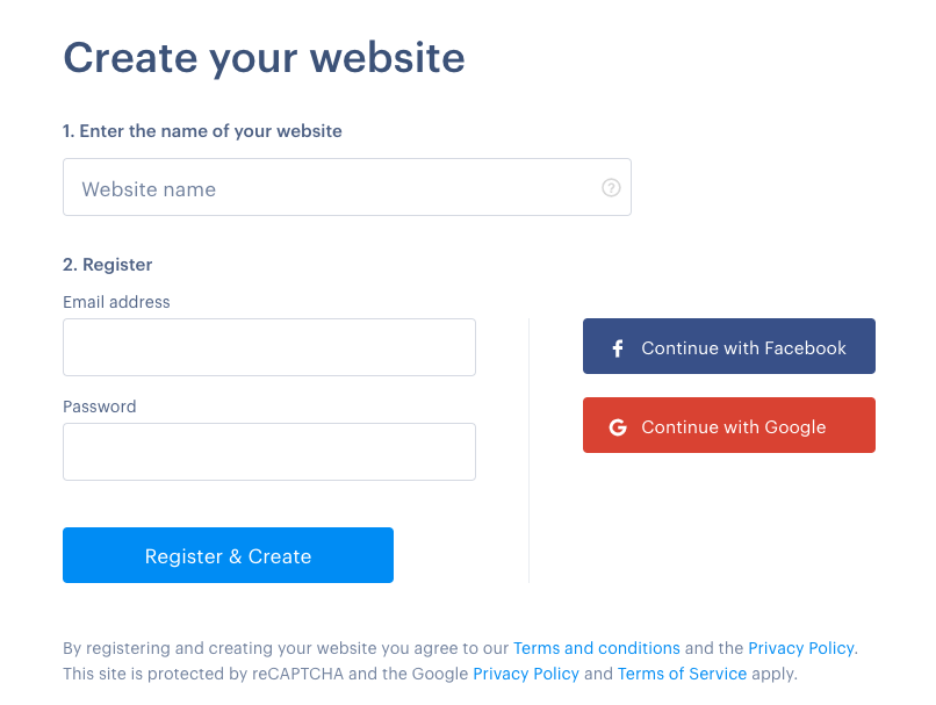
Website name
The name you chose for your site will be part of your web address, called a domain name. On Webnode, you start with a free subdomain. If you choose the name ‘Handy Helper’, your subdomain will be handyhelper.webnode.page.
You can later upgrade to a custom domain like handyhelper.com for a more professional look. To make sense of web addresses and domain names, see this article on domains vs. subdomains.
Tip: Webnode’s paid plans include a free custom domain for the first year
2. Create Your Website with AI or Templates
Whatever the task, a good handyman comes prepared with his toolkit. Webnode offers handymen two tools for creating websites: modern AI and professional templates.
AI Website Builder
AI speeds up the creation process to make crafting a handyman website almost instantaneous, leaving you plenty of time to do what you do best: work with your hands, do maintenance, and satisfy customers.

The Webnode AI Website Builder enables you to quickly:
- Generate texts – titles, page names, headings, subheadings, paragraphs, etc.
- Pair content– relevant images and visuals are matched logically to text content.
- Structure pages – all pages on your site are predefined for any purpose a DIY handyman might need.
- Get online fast – a polished website ready to launch in seconds.
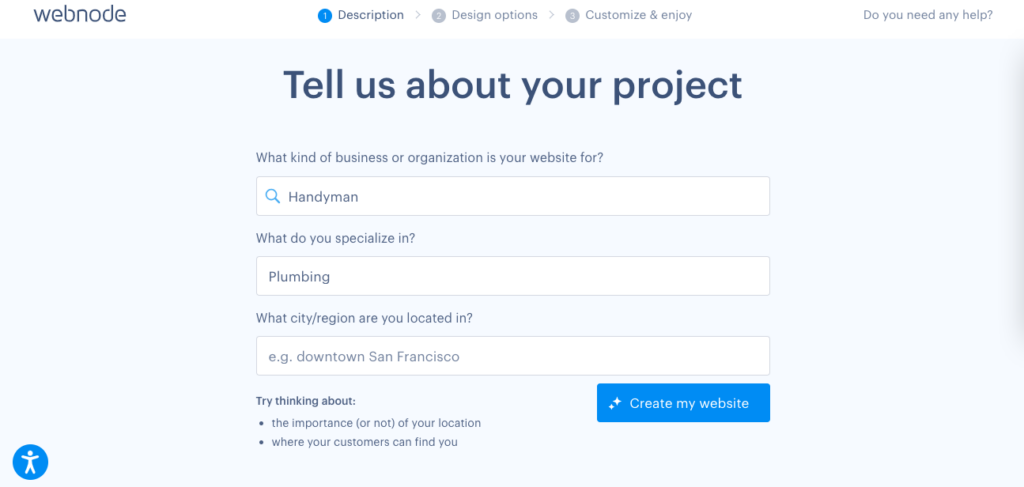
Answer a few questions and you’ll be on your way.
Website Templates
If you’re interested in a handyman website template, look no further than Webnode’s expertly designed Services & Maintenance website templates, ideal for those skilled with their hands.
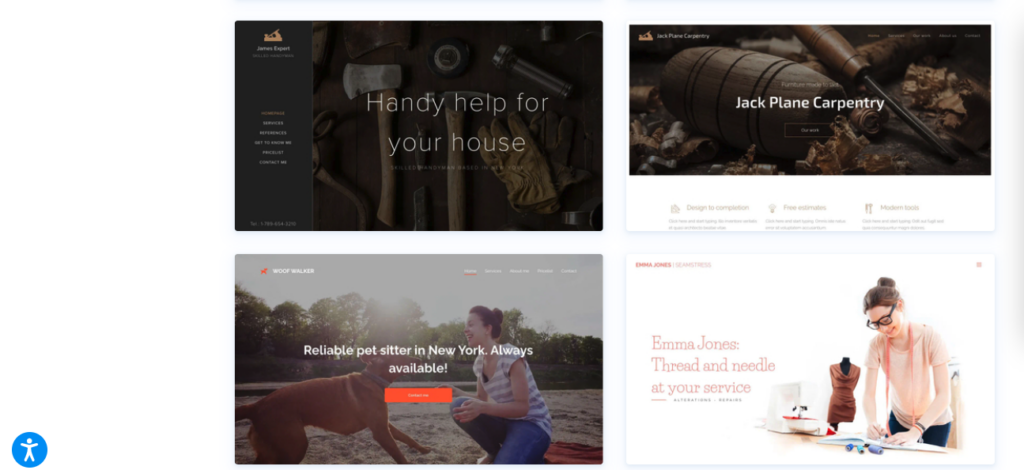
With website templates, you can:
- Pick an attractive design from the template gallery based on your favorite colors. Combinations and layouts are customizable to your needs or brand.
- Preview the navigation features such as the menu, footer, and header function so that you can make an informed decision.
- Personalize all text, images, colors, and fonts to create something entirely unique for your business.
Picking the perfect template is just the beginning. The drag-and-drop editor is easy to use and intuitive, regardless of your experience level in building websites.
Both templates and AI offer a professional starting point for your site. If you want to personalize your website further, you can at any stage—even after publication.
3. Edit Your Website Design
Next, it’s time to personalize your handyman website design. You don’t need to be an artist to create a professional-looking website.
Webnode’s drag-and-drop editor makes it easy to:
- Change colors, fonts, and background images
- Add your logo and contact details
- Arrange content blocks in seconds
- And create without stress
This is perfect for anyone who doesn’t have tons of experiences and wants to build a handyman website without coding.
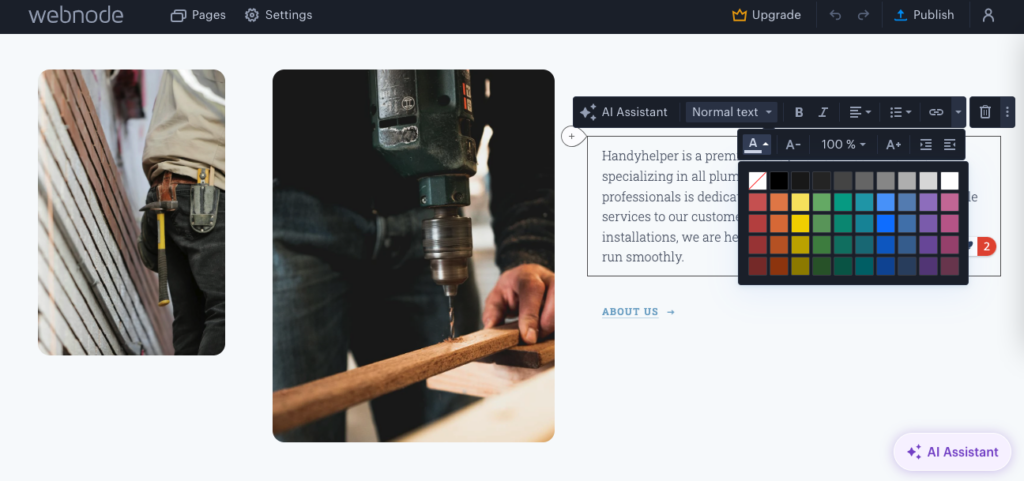
An AI-generated website being edited in Webnode
Tip: Incorporate any existing brand details, such as colors, vehicle prints, and logos, into your website. Make yourself recognizable at first sight.
4. Add Essential Website Content
Your website should already have a logical structure that makes guest navigation easy. However, there is always room to adapt the structure to your specific needs.
A great website for handyman services should include these key sections:
- Homepage – introduce your main services and include an irresistible call-to-action text or button (“Get a Free Quote”).
- Services – clearly list what you offer—repairs, installations, maintenance, etc. Where appropriate, briefly explain what these services involve in a way that a layperson can understand.
- About Me – Some people will want to know more before they hire you. Share your experience and credentials using your personality.
- Gallery/Portfolio – Showcase photos of your past work, recent activity, and greatest successes.
- Testimonials – display client feedback to show potential customers that you’re trustworthy and finish the job—well.
- Contact Page – add your phone number, email, contact form, and map location.
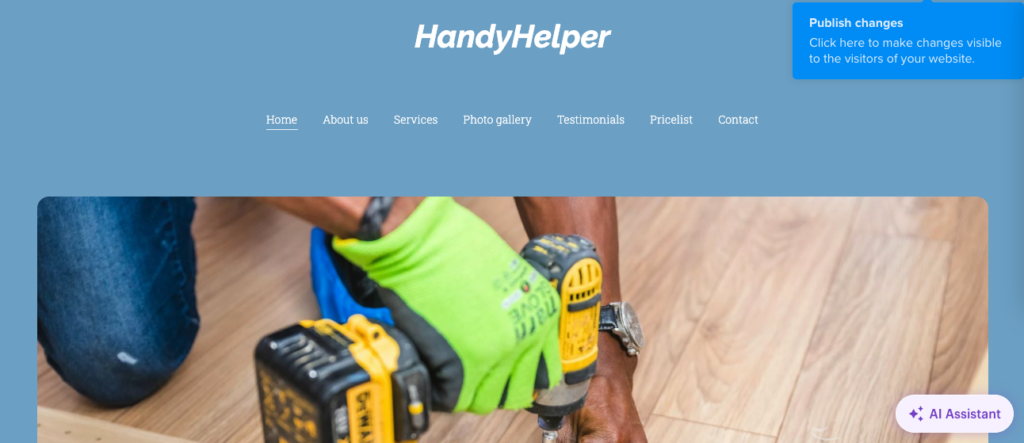
If you’re worried about writing compelling webpages, Webnode’s AI Assistant can generate text suggestions to help you write effectively.
5. Publish and Promote
Once everything looks up to scratch and you’re satisfied, publish your site with a single click. And just like that, you’re live.
Knowing how to promote a handyman business online is key to attracting a steady stream of clients.
Focus on:
SEO
Search engine optimization (SEO) helps customers find you online. Use keywords and popular questions that people in need of a handyman might type into Google. For example, “handyman in [your city]”. A description of your services on your website will also help connect you with the right people.
Google Maps
For better discoverability on Google, add your business location to Google Maps—this helps local people find you.
Social media
Websites and social media work best when used together. Share your website link on the social media platforms where your audience is most active, and anywhere you might already have a following.
Directories
Many still prefer to use directories that promote trusted workers when searching for handymen and similar professionals. Register with the popular directories in your area.
Recommendations
Take your word-of-mouth marketing to the next level by sharing your social media and website with satisfied customers. It won’t be long before more than friends and family know about your skills.
Blog
Share interesting stories, photos, and a few tips to demonstrate your know-how on your website blog. Customers will value your time-saving expertise even if they know a thing or two themselves.
How Much Does a Handyman Website Cost
Whether you’re a small business owner or self-employed, the cost of your website is a major factor to consider. Webnode has flexible plans, whatever your budget.
Free handyman website
You can try Webnode and start experimenting for free. Even without your credit card details.
This option is perfect for hobbyists or those whose businesses are just starting out. If you’ve never made a website before, you can start tinkering around with no financial commitment.
Premium handyman website
Premium plans are paid and unlock features such as connecting your own domain name, more storage, removing ads, and advanced customization options. These additions are useful if you’re creating a professional website or planning to grow your online presence.
Webnode offers three premium plans:
MINI:
Connect a domain name, premium customer support, website statistics, and everything else you need to run a simple yet stunning website on a budget. Great for those starting out and ready to get stuck in.
STANDARD:
The flexible premium plan chosen by more than 50% of Webnode customers. Includes all the benefits of the MINI plan and options to open an online store, remove Webnode branding, and integrate with Google (Analytics, Adsense, etc.). Perfect for growing businesses and freelancers ready to take the next step.
PROFI:
Become professional with a fully equipped website that includes all the features of the previous premium plans, more storage and bandwidth, unlimited backup and recovery, and more. If you’re a professional ready for the next level, this is the plan for you.
Tip: Learn more about Webnode pricing and plans
Hiring a web developer could cost hundreds or thousands of dollars at the higher end. With Webnode, you can build a basic website for free.
When you’re ready to up your game, investing in a premium plan will make your website more credible and feature-rich.
Handyman Website Examples
Take inspiration from the best handyman websites across the web. You can check what other professionals have accomplished and implement some of their ideas.
Here are some useful details to include:
- Simple navigation that highlights services and prices clearly. Don’t confuse people and lose their custom.
- Strong, topic-relevant visuals such as before-and-after project photos work great, either on your homepage, blog, or service page.
- Prominent contact buttons or booking forms—buttons with text such as “get a quote” or “call now” can help visitors navigate your site quickly.
- Testimonials or Google reviews displayed visibly to communicate what your customers value most: trustworthiness.
Lury from Reparos24hr is a handyman that implements many of the ideas listed above:
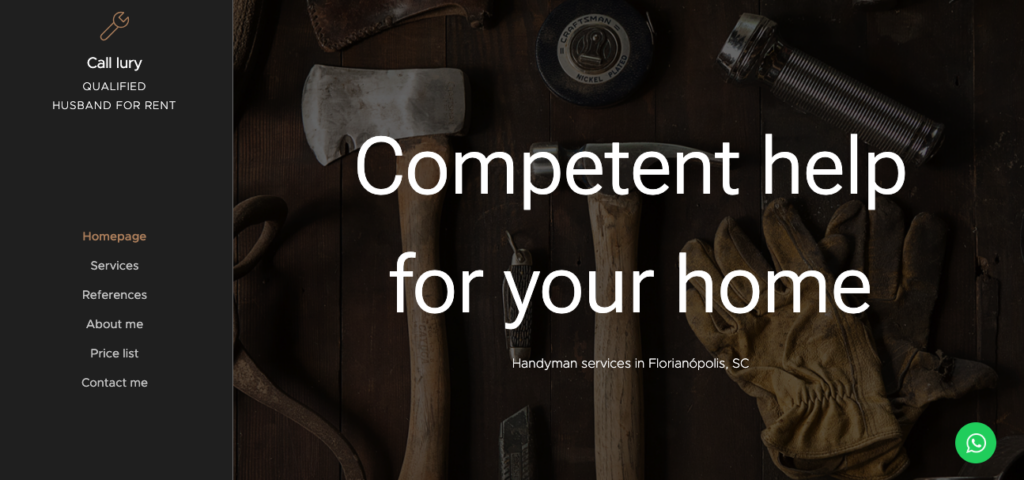
Notice the WhatsApp logo/button in the bottom right corner, inviting communication
Topic-relevant imagery of tools is shown on the homepage, welcoming guests and telling them they have come to the right place. You can also see the name of the handyman, his location of work, and a navigation menu on the left side of the screen.
His domain name even reveals he is a 24-hour handyman, suggesting he answers emergency calls. Lury tells you almost everything you need to know about him without having to scroll your mouse wheel, digging for more information.
Simply4less is another website with relevant imagery and provides information for potential customers upfront:

Simply4less’ homepage tells you in straightforward language about the services they provide, promptly followed by testimonials from satisfied customers. This London-based business even reveals their customer-first business philosophy through their motto: “Always pay less”.
Conclusion
A website is a powerful tool that helps customers trust you, choose you, and recommend you.
Creating a handyman website doesn’t have to be complicated. With Webnode, you can build a professional site quickly and simply. Whether you want to show your work, get more local clients, or make it easier for people to contact you, Webnode gives you everything you need.
Start today, build your online presence, and make sure customers in your area can find you when they need help.
Handyman Website FAQ
Should a handyman have a website?
Yes. Having a website as a self-employed handyman or small business owner is a no-brainer. It’s the best way to sell your expertise online and outside your immediate circle of family and friends. It shows initiative, digital, and practical skills.
How long does it take to build a website?
Minutes. With Webnode’s AI Website Builder, your online home can be generated in just seconds after receiving your prompts. If you want to customize the result afterward, you can spend as much time tweaking that output as you want.
What is the best website builder for a handyman?
There are many website builders to choose from, but some are more beginner-friendly than others. Webnode is particularly appreciated for its simplicity and ability to create a polished, professional websites.
Should I use my business name as my domain name?
Yes, ideally your website and business name should match. This looks professional to potential customers and helps promote your business name.
How often should I update my website?
Ideally, once a month. Make sure your services, contact details, and testimonials are up to date.

Jamie Faulkner writes and edits copy to build community, inform, and inspire action through blogs, newsletters, and email strategy. He is particularly interested in sustainability, technology, travel, health and fitness, and education. Above all, he is passionate about storytelling—both in the marketing world, helping brands connect with their audiences, and through his published short fiction. Jamie is also the co-founder of education provider Discourse Hub, where he teaches and creates content for blogs, newsletters, and social media.