From Clicks to Customers: Create an Ecommerce Website with Ease
October 16th, 2025
For entrepreneurs and small business owners, the ecommerce boom represents a huge opportunity to start a business with a low initial investment. Whether you run a beauty salon, a boutique, or are just starting your first venture, creating an ecommerce website has never been easier or more affordable.
This guide walks you through how to start an online store step-by-step using Webnode, fast and without coding.
What you’ll learn:
- When is it time to start selling online
- What to look for in an ecommerce platform
- How to create an online store step-by-step
- How much does a Webnode ecommerce website cost
- How to promote your ecommerce website after launch
- Webnode’s ecommerce solution FAQ
When is it time to start selling online
The global ecommerce market is growing. Imagine you are the owner of a beauty salon who is looking for opportunities to grow your business. Maybe you’re wondering how to create an ecommerce website from scratch – or if you should at all.
Here are a series of questions to ask yourself when thinking about whether you should expand online
- Customers ask for It:
If your clients keep asking “Where can I buy your shampoo?”, it’s a sign you should offer an online shop. - Too many phone orders:
When taking orders over the phone has you pulling your hair out, an online store can make things easier for you and your customers. - Social media interest:
If you’re promoting your products on Instagram or Facebook and getting lots of comments or messages, it’s time to have a simple website where people can order. - Convenience for everyone:
An online shop lets customers order at any time, even outside salon open hours, which can help boost your sales. - Growing customer base:
If more and more people are showing interest in your products, an online store helps you reach new customers who might not visit your physical location. - Lack of organization and efficiency:
An online store helps you track which products are popular, so you can manage your stock better and avoid running out of best-sellers.
What to look for in an ecommerce platform
Don’t close your eyes and pick an ecommerce platform blindly. Not all businesses face the same challenges. It’s important to choose a platform that suits your needs and the needs of your business.
What’s the top ecommerce website builder for you? Here are some factors to consider:
- Ease of use: Look for a system that’s as simple as posting on social media — easy steps to add your products and update prices.
- Affordable pricing:
Make sure the cost fits your budget, with clear monthly fees and no hidden charges. - Mobile-friendly:
Many of your customers use their phones, so the online shop should look great on both mobile devices and computers. - Helpful customer support:
Choose a platform that offers friendly support to help you if you ever have questions or run into issues. - Secure for your customers:
It should protect your customers’ personal and payment information so they feel safe buying from you. - Flexible payment options:
Ensure it accepts different ways to pay (like credit cards or PayPal) so your customers have choices. - Simple product management:
It should be easy to add and organize your products without any complex steps. - Easy customization:
The platform should let you add your own style — colors, logos, and photos — to make it feel like your personal brand. - Scalable solution:
Choose a platform that can grow with your business. As you start selling more products and add new lines or services, the platform should handle the extra traffic and orders without any problems. - Ecommerce website templates:
Take a closer look at the platform’s ecommerce website templates and examples of ecommerce websites. - Try It Out First:
Look for a free trial so you can test it out before you decide to commit.
Ready to start selling online? With Webnode’s ecommerce website builder, launching your professional online store is easier than you think.
How to create an online store for an affordable price with Webnode
Follow our simple step-by-step guide and set up your shop in just a few clicks.
1. Getting started with Webnode
Registering with Webnode takes only a few minutes, and you’ll be on your way to building the website of your dreams.
- Go to Webnode and enter your Website Name, Your Email Address, and a Password. Then, click the ‘Register & Create’ button.
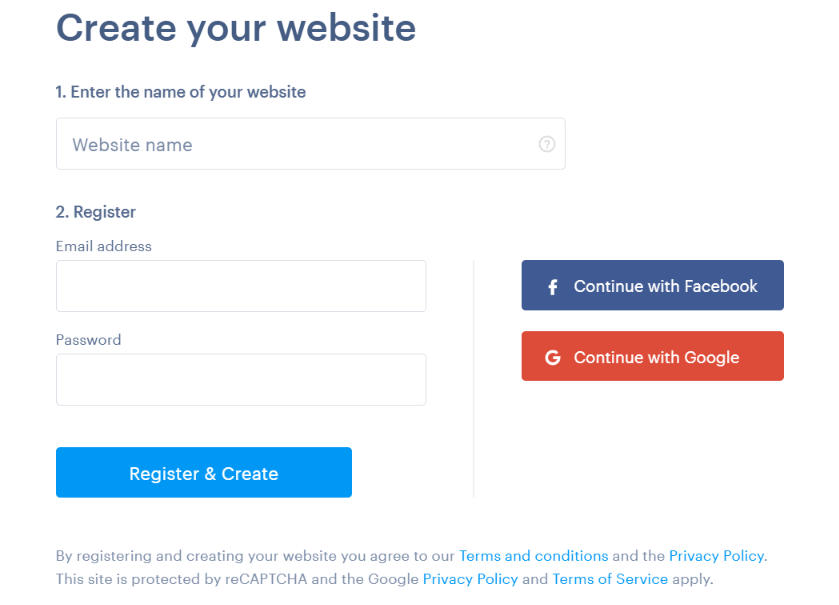
When you choose your website’s name, this name will be part of your web address. For example, your web address might be mywebsite.webnode.page.
However, if someone else is already using that name, we’ll automatically add a number to your web address to make it unique. So, it might become something like mywebsite12.webnode.page.
That’s why it’s a good idea to choose a name that’s unique and, if possible, short and easy to remember.
Picking a name for your ecommerce store
You don’t have a fully formed brand until your store has a name. A cleverly chosen domain name and good reputation can put you at the forefront of everyone’s mind. When you think of books for example, one of the first names to pop into your head will probably be Amazon. A bad or uninspired name, however, can sink your business.
For an online store, it’s advisable to use a custom domain (mywebsite.com, for example). This is a paid feature and it comes with several benefits:
A more professional image – A custom domain makes your website look more credible and trustworthy.
Easier to remember – Customers are more likely to recall and return to your site.
If you’re serious about building a strong online presence, having your own domain is a valuable investment that can pay off in the long run.
Tip: Webnode’s paid plans include a free custom domain for the first year
2. Choose your website template
Your store should have a personality that attracts new customers and makes loyal customers proud to be associated with you. Choosing the right template is an important step in creating your website. Webnode offers a wide variety of free website templates designed to suit your business needs.
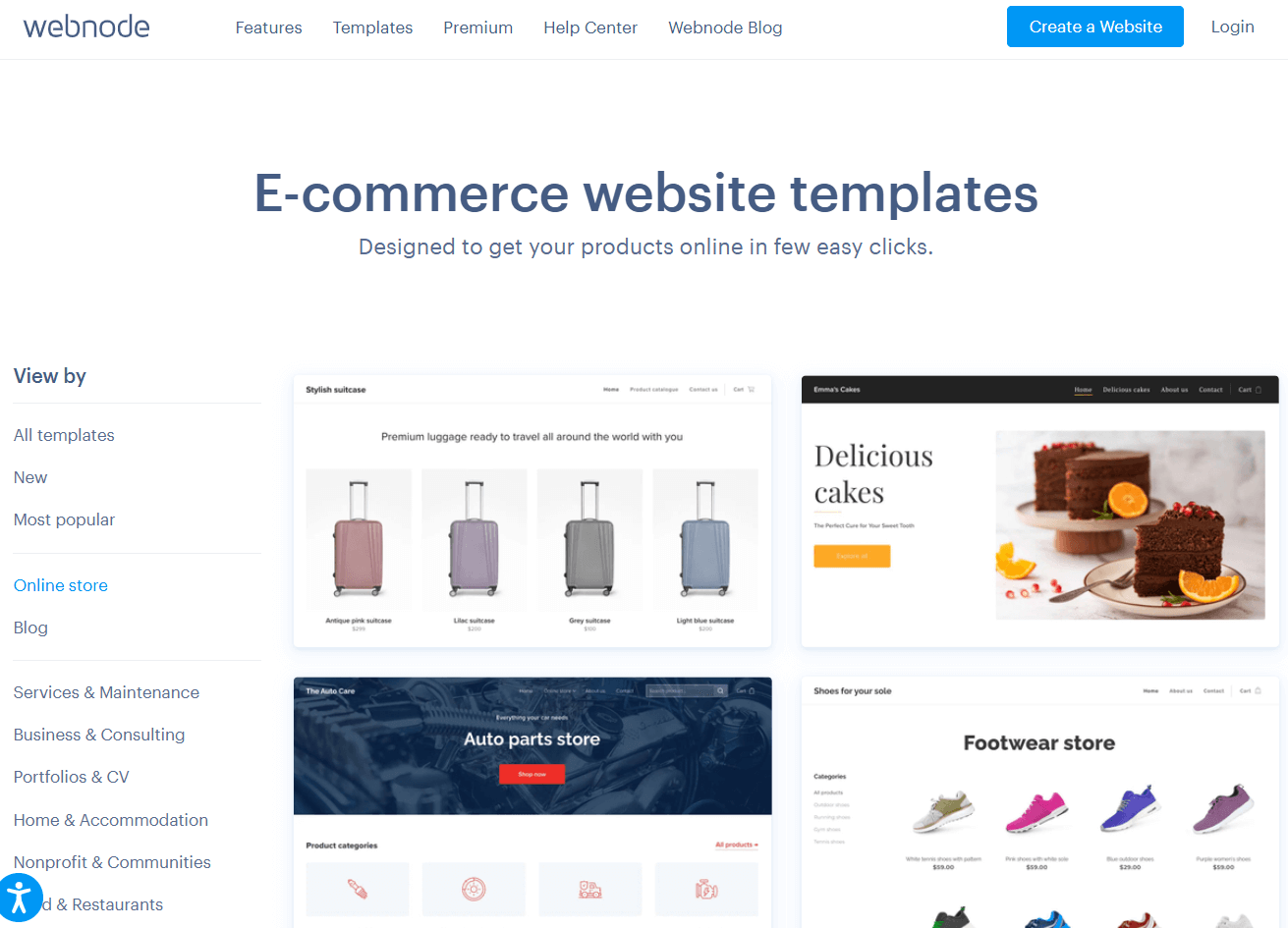
- Explore the gallery – Webnode provides an interactive preview, allowing you to see how the menu, footer, and header function before making a selection.
- Pick based on design – Choose a template based on its layout and color scheme, then customize it to match your brand.
- Full customization – You can personalize all text, images, colors, and fonts to create a unique look.
All Webnode templates are free to use and fully mobile-friendly, ensuring a smooth experience on any device. While you can’t switch templates after selecting one, you can customize it extensively to fit any concept. Simply choose the one you love and make it your own.
3. Customize your design
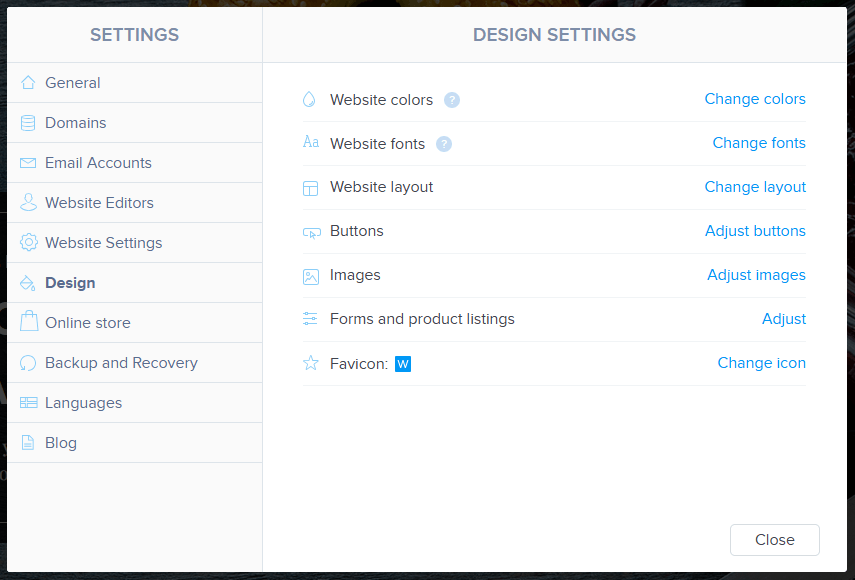
Now that you’ve chosen your template, it’s time to make it your own. Customizing your website in Webnode is easy and intuitive, allowing you to tailor every detail to match your brand.
What You Can Customize:
- Colors & Fonts – Adjust the color scheme and typography to reflect your style.
- Layout & Sections – Rearrange elements, add new sections, or remove anything you don’t need.
- Buttons & CTAs – Customize call-to-action buttons to encourage visitors to take action.
- Logos & Icons – Upload your brand logo and select icons that enhance your website’s personality.
If you would like to add more motion to your webpage, premium package subscribers can take advantage of our video background feature.
No experience in web design? No worries. Webnode’s intuitive drag-and-drop editor makes it easy to create a professional-looking website. Plus, you can find useful tips and inspiration in our web design guide to help you make the most of your site’s look.
4. Plan your store layout
Imagine once again that you are the owner of a beauty salon. Think of your online store like a well-organized boutique.
You have different sections for hair styling and combs, and for manicure and pedicure products, etc. Customers will browse through virtual shopping aisles to look at what’s on the shelves.
Online, this is called information architecture (IA), and it’s simply the way you organize your website–grouping products into clear categories, setting up simple menus, and planning where everything goes.
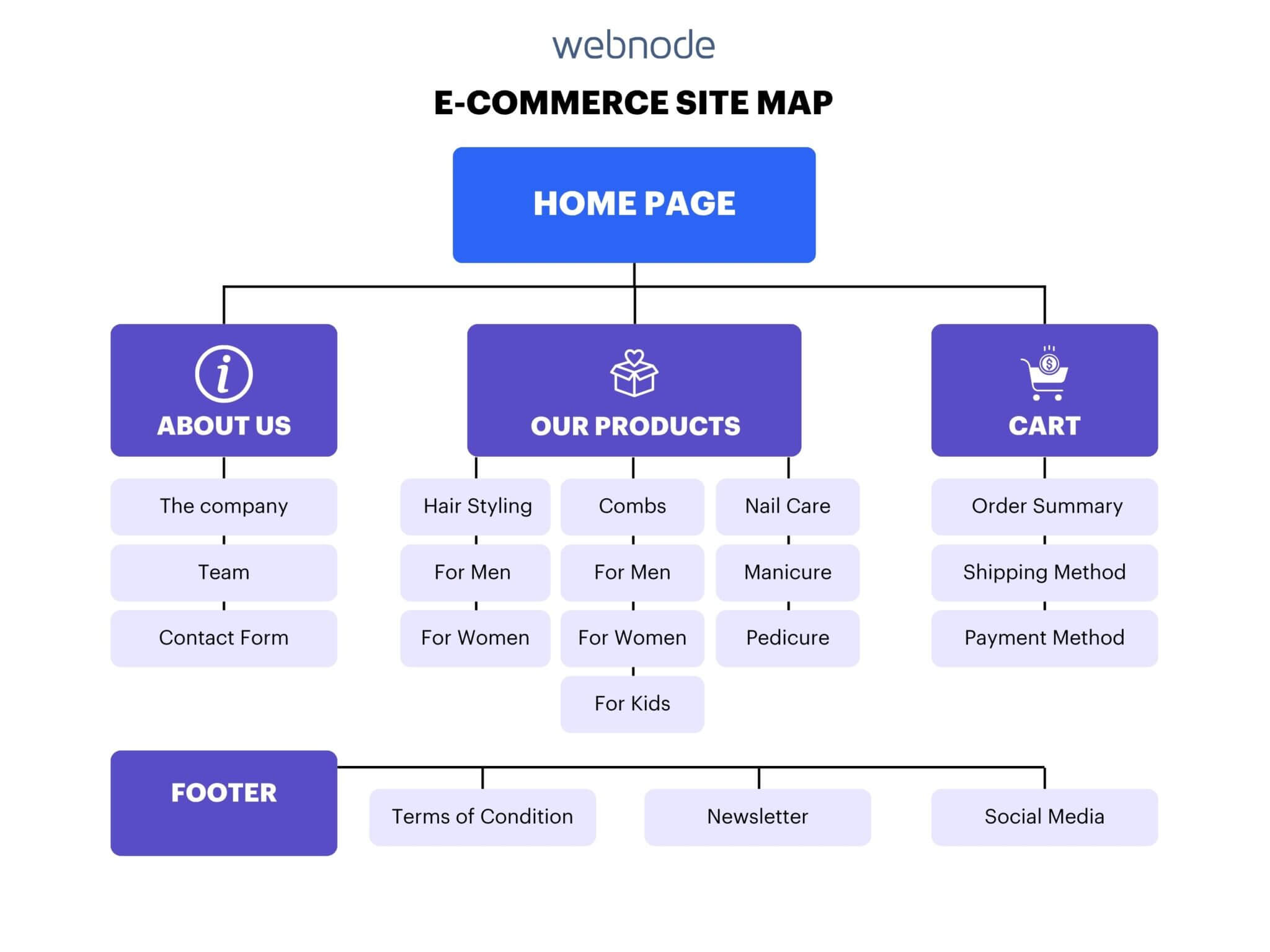
A straightforward, logical layout helps satisfied customers easily find what they’re looking for, making their shopping experience smooth and enjoyable – and that, in turn, boosts your sales.
5. Create your website content
Once you have chosen a template and taken care of the design, it’s time to add content that moves your customers toward you making a sale. This is the most important part of any e-shop, blog, or website.
Key Elements to Include:
- Clear and compelling headlines that instantly communicate what you do.
- Calls to action (CTAs) like “Try Our Bestsellers”, “Get 10% Off Your First Purchase”, or “Shop Now”.
- Contact forms & touchpoints so customers can easily reach you.
Not everyone has the budget for a professional copywriter, but great content is still possible with AI. Webnode’s AI assistant generates personalised text and designs page layouts within your new or existing website. Just generate content to quickly build your website copy, then tweak and refine it to make it truly yours.
Generally, shoppers go through these stages before they buy a product:
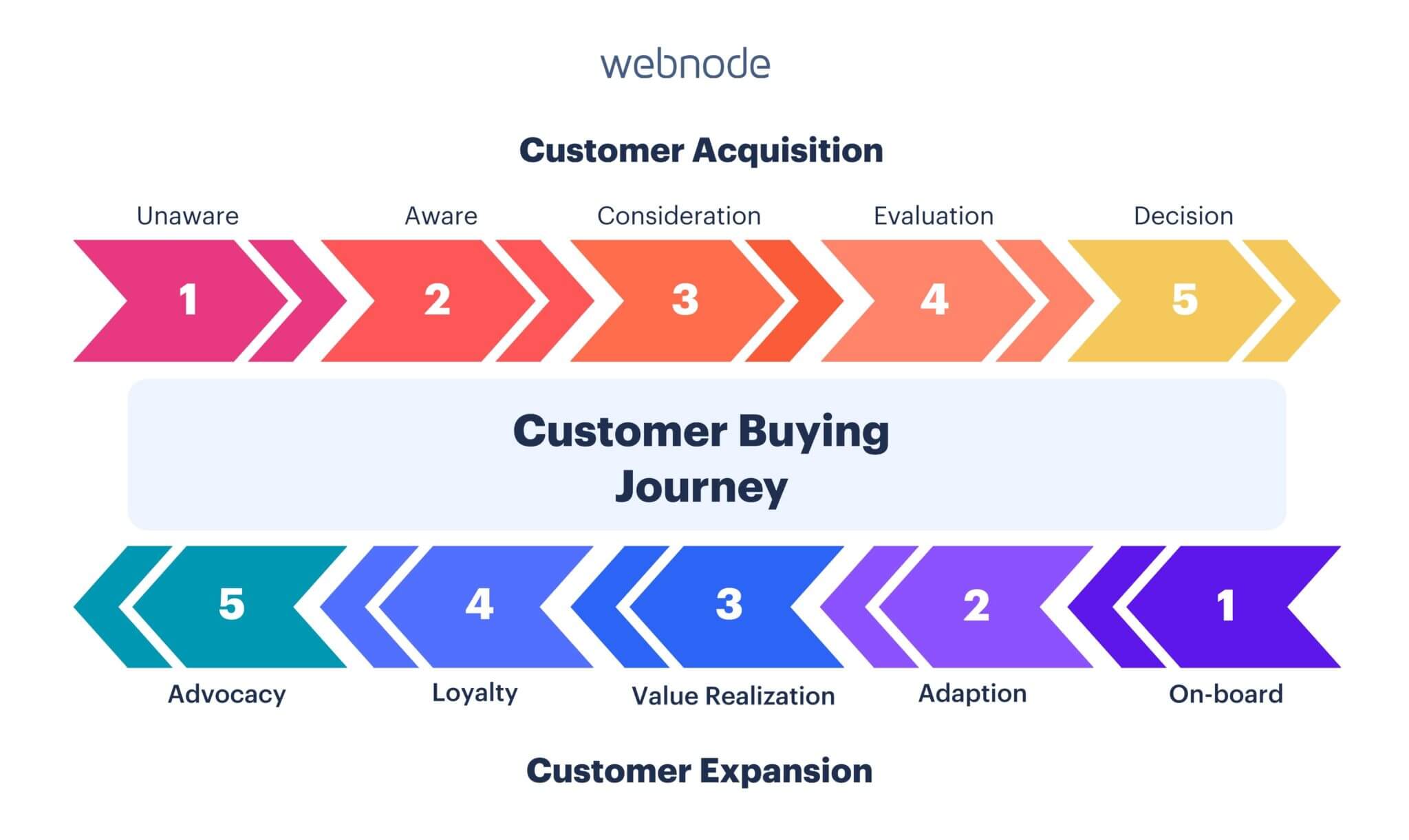
The content of your online store should help the visitor advance through the shopping process outlined above.
When working on the content of your store, think about the stage your visitor is currently in and how that particular content will help move them toward a sale.
Add images and videos of your products
Online stores face a serious disadvantage when compared to physical ones – potential customers cannot directly touch your products.
To overcome this obstacle, images and videos on your product pages are crucial. It’s highly recommended to use professionally taken images from different angles. If you can’t hire a professional, take the photos yourself in a well-lit environment and use a quality camera.
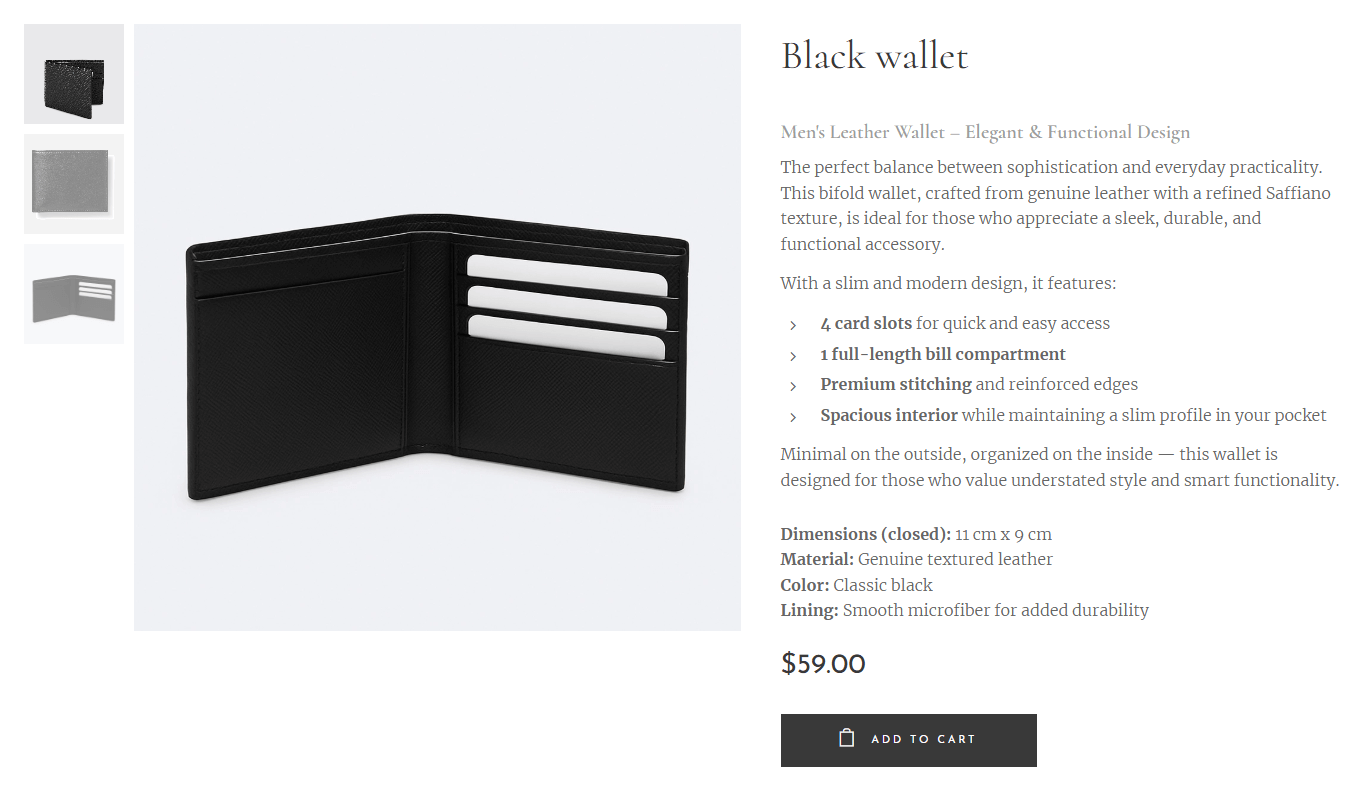
Video is an excellent way to present a product in more detail. The more professional the video, the better. However, there is more wiggle room for video quality on your product page when compared to images. Customers are getting used to seeing amateur product demonstrations on YouTube and social media.
If you have a short video presenting your product, place it at the top of the page. Longer videos with additional information are better suited for the bottom of a product page.
6. Set up payment methods
Once you have convinced a visitor to press the buy button, it’s important they’re able to complete their order easily. If there’s a problem, a few customers might try to contact you. Most, however, will simply shop somewhere else and you will lose the sale.
With Webnode, you don’t have to worry about how the payment process works. Our system is designed by experts to make shopping easy. Among other things:
- A customer doesn’t have to register to make a purchase
- The process is shown step-by-step during checkout
- It’s compatible with smartphones and other devices
- And includes boxes that need to be checked in accordance with data privacy laws – allowing you to comply with regulations without any complicated setup.
Shoppers today favor payment methods that are easy to use, trustworthy, and flexible. Digital wallets lead the way globally, followed by credit and debit cards, while in some regions bank transfers or cash on delivery remain common. Buy Now, Pay Later is also on the rise, especially among younger customers.
- Go to Store Settings → Payment Methods in your Webnode dashboard.
- Choose the methods you want: e.g. PayPal, Stripe, bank transfer, etc.
- Set them up / connect with the external provider (PayPal account, bank credentials, etc.).
- Test your checkout flow on desktop and mobile to ensure everything works.
Tip: you might wish to offer customers additional payment methods or rewards at checkout. View Webnode’s support page for instructions on how to implement discounts, vouchers, or free delivery.
Data Privacy
When someone buys from your online store or fills out a form, they are trusting you with their personal information. That is why it is important to protect their privacy and follow the legal rules. This helps you avoid problems like fines or legal issues.
Webnode gives you tools to manage this, but the rules can change depending on where your visitors are located.
For example, if someone visits your site from California, you need to:
- Clearly explain what data you collect, especially on forms like a newsletter sign-up
- Include a link or button that says “Do Not Sell or Share My Personal Information”
- Respect browser settings like Global Privacy Control if the visitor has them turned on
You only need to ask for permission with a checkbox if you are collecting sensitive information or targeting children.
In other parts of the world, like the European Union, you must ask for permission before collecting personal information. This usually means adding a checkbox that says “I agree to the privacy policy.
Tip: If you want to keep it simple, use the EU-style checkbox for all visitors. It’s a good all-in-one solution to stay compliant.
7. Set up shipping options
Logistics is one of the most important parts of setting up an online store. Not only does it influence the cost of sales but also the shopping experience. Receiving a product in a week simply isn’t as satisfying as getting it the next day.
Approximately 25% of your turnover will go to the company providing your logistics. You must take into account that this company will also be perceived as the ‘face’ of your company when a customer receives your product.
Therefore, along with the product niche you sell, the choice of logistics company is one of the most important decisions for the success of your online store.
What customers expect and what works best
- At least one affordable “standard” shipping option.
- An option to get their order faster, even if it costs more.
- Clear pricing (by weight, by location) so they know up front what shipping will cost.
- Possibly free shipping above a certain order amount.
- Tracking info so they can check where their package is.
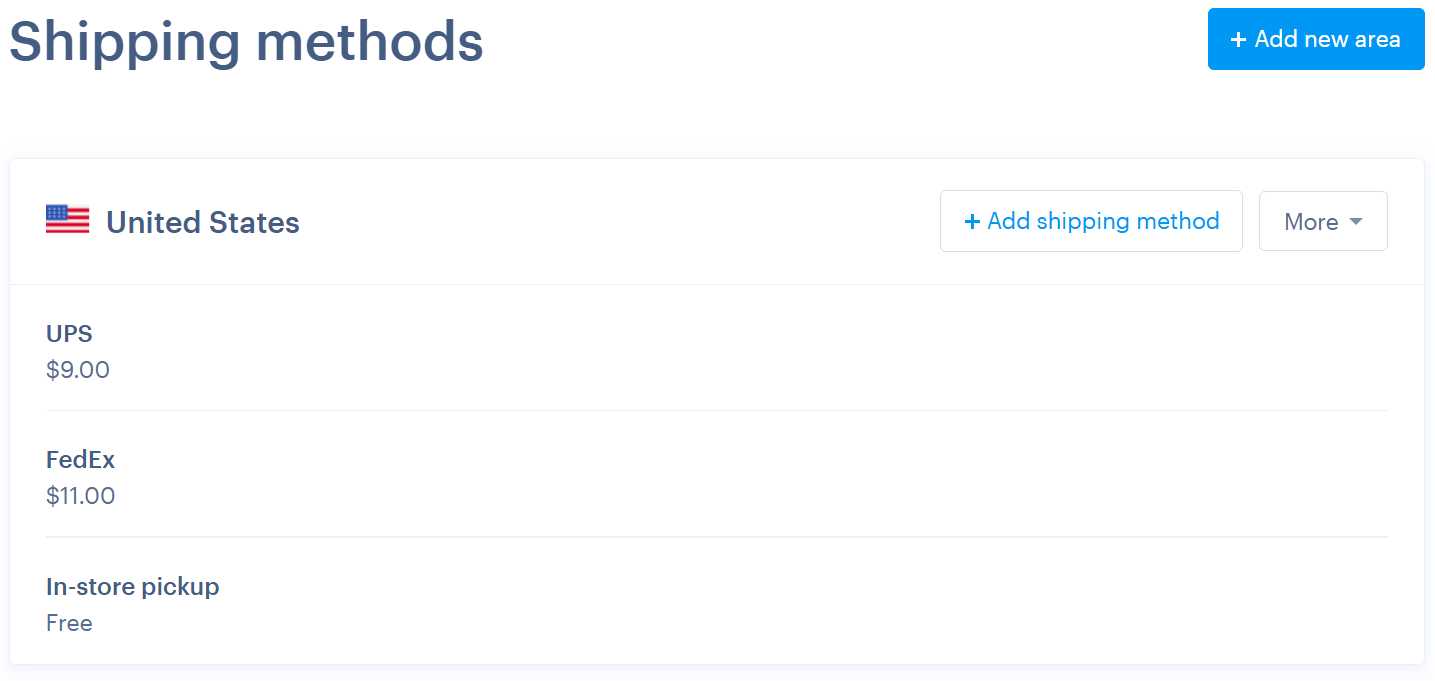
Shipping options Webnode supports
Here are the key shipping features you can enable in Webnode:
- Add and edit shipping methods (name, price, VAT, tracking) for each method.
- Set shipping price by weight of the order.
- Use different shipping rates for different countries or regions. (Note: shipping by country/region require the Profi plan or superior)
- Free delivery / free shipping for orders over a set amount.
- Package tracking: some carriers have tracking built in; with others, you can set up tracking manually.
Quick setup steps in Webnode
- In your Webnode dashboard, go to Store → Shipping methods.
- Use a pre‑defined method or create a new one. Set the name, price, and tracking URL if available.
- If you have different regions or countries you ship to, add shipping prices for each.
- If your products vary widely in weight/size, enable shipping by weight.
- Consider setting “free delivery” above a certain order total to motivate customers.
- Always test the checkout process yourself: select different shipping options, different addresses, weights, etc., to see how prices differ.
8. Launch Your Website
You’re almost there. Before you go live, do a final review to ensure everything looks and functions perfectly.
Final checklist before publishing:
- Check all text and images for accuracy
- Test navigation, links, and buttons
- Make sure your CTAs (call-to-action buttons) are clear and engaging
- Add your social media links to connect with visitors beyond your website
Once everything looks great, hit “Publish” and share your site with the world.
How much does Webnode charge for ecommerce
Now, all you bargain hunters out there are probably wondering how to start an online store with no money. You can try Webnode’s solution and create a website for free, allowing you to familiarize yourself with our tools.
However, the cost to build an online store and actually run that online store requires one of our ecommerce plans. Set up your online store and get in touch with us to activate your Premium plan.
Webnode offers three different ecommerce plans for entrepreneurs, all of which include a free domain:
| Premium Plan | Business | Profi | Standard |
| Features | Full-service plan for professional ecommerce | Bought by more than 50% of our customer | Basic service for starting your first online store |
| Premium customer support | ✔ | ✔ | ✔ |
| Email accounts | Unlimited | 100 | 20 |
| Store analytics | ✔ | ✔ | ✔ |
| Product import | ✔ | ✔ | ✔ |
| Google Analytics | ✔ | ✔ | ✔ |
| Google AdSense | ✔ | ✔ | ✔ |
| Google Tag Manager | ✔ | ✔ | ✔ |
| Membership registration | ✔ | ✔ | ✔ |
| Product feed | ✔ | ✔ | |
| Conversation tracking | ✔ | ✔ | |
| Product variants | ✔ | ✔ | |
| Discounts | ✔ | ✔ | |
| International shipping | ✔ | ✔ | |
| Site search | ✔ | ✔ | |
| Manual orders | ✔ | ||
| Automatic invoicing | ✔ | ||
| Store email customization | ✔ | ||
| Multiple currencies | ✔ | ||
| Annual Subscription (without any discounts applied)* | $418.80 | $318.00 | $202.80 |
Promote your Ecommerce website after launch
You’ve opened a brand new online store. To be successful, you will need to attract paying visitors.
This is where platforms like Webnode shine. By saving hours on maintenance and programming, you can maximize the time spent promoting your business – an activity that has a high impact on sales.
Here are some of the ways you might manage marketing and promote yourself to get new customers through your door:
Listings, Reviews & Social Proof
| Platform | Best For | What To Do |
| Google Merchant Center | Free product listings in Google search | Connect your catalog for more visibility |
| Review platforms (e.g. Trustpilot, Judge.me) | Building trust with customer reviews | Automate review requests and show stars on your site |
| Amazon Marketplace | Extra sales if margins allow | List bestsellers only; be mindful of fees |
| Google Business Profile | Not needed for online-only stores | Only use if you have a showroom or pickup |
| Yelp & Map Listings | In-person services | Skip unless you offer local services |
Tip: Focus on Google Merchant Center and a trusted review tool first. They’re the easiest way to build visibility and trust without extra fees.
Pay per click (PPC) – Online Ads
Many shoppers use search engines such as Google, Bing or Yahoo as their first step to find the products they need. Placing an ad on a search engine results page puts your product in front of many potential customers.
This method of advertising is called PPC because you pay for every time a potential customer clicks on your ad.
Invest in products that sell the most (or you expect to sell the most) in the geographical areas where it’s easy and cheap for you to ship.
Remember, the cost of the ad campaign, plus the cost of the product and shipping, should be low enough to give you sufficient profit margin.
If you’re new to PPC, it can be a bit tricky to set up effective campaigns. To make sure you’re not wasting your budget and that you’re targeting the right people who are likely to become your customers, it’s often a good idea to consider hiring a specialist for the initial setup of your campaigns. They can help you optimize your spending and ensure you’re getting the best results.
Content marketing
Creating valuable content on the topics that interest people is a great way to engage with potential customers who are looking for products or services.
You’re not directly selling with this approach, but rather creating and promoting content that excites your target customer. This can include informative blog posts, videos, or social media posts that help educate, address pain points, and demonstrate why your product is needed. This should be done indirectly without forcing a sale.
Search Engine Optimization (SEO)
Ecommerce website optimization is essential. Good SEO is when your online store is optimized with keywords so that Google and other search engines show your products in organic search results. This type of traffic is free, but it can require a good deal of time and work to perfect.
When people shop online and type a query into a search engine, they rarely look further than the result’s page – sometimes they might not scroll lower than the first few links offered. For this reason, your web content and keywords need to be planned carefully.
Thankfully, Webnode takes care of all those crucial, technical aspects on your website on your behalf. This way, you’re free to focus on the SEO of your website content.
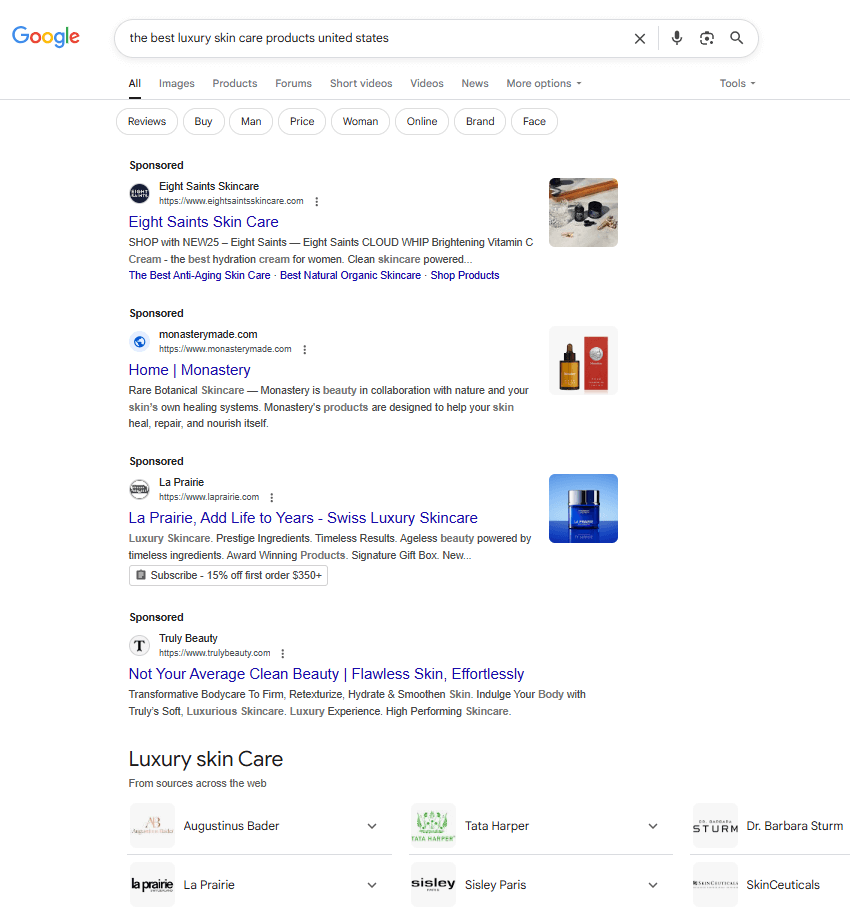
Be sure to include keywords that target what customers are searching for or that provide answers to their questions. Webnode makes it easy to add a blog to your shop.
Social Media
Social media platforms are great places to build an audience of raving fans who are interested in your company and products. Posting engaging education or entertainment content can help build your ‘know, like, trust’ factor with potential customers.
Where US-based e-commerce brands should invest their social time in 2026:
| Platform | Best For | Why Use It |
| Fashion, beauty, lifestyle, DIY | Visual content + shoppable posts and Reels for strong product discovery | |
| TikTok | Impulse buys, low-cost products, creators | Viral reach + in-video checkout with TikTok Shop |
| Broad audiences, local delivery, promotions | Largest user base; Shops & Marketplace support direct selling | |
| Home decor, crafts, premium products | High-intent search traffic; Pins last long and drive higher-value sales | |
| YouTube | Demos, tutorials, unboxings | Great for search and video-based product education |
Tip: Focus on 1–2 platforms where your audience spends the most time, and where your content (visual, video, etc.) fits naturally.
Email campaigns
Email Campaigns are a powerful promotional tool as you’re advertising to people who have already expressed an interest in your store by signing up for emails that go directly to their inbox. Through email marketing, you’ll be able to reach them with direct messaging, offer exclusive discounts, and retarget previous customers.
Google Analytics
Without data you’re just guessing – install Google Analytics from day one so you can see exactly how shoppers find, engage, and convert on your site.
This way you can find out how people came to your shop (e.g. through email, Google, Facebook, etc), which pages they visit most, and which products are bought most often. You will be able to see if more sales come through organic or paid traffic and which landing pages are performing best.
To ensure you make the best marketing investments, Webnode allows you to connect your online store with Google Analytics in some easily laid out steps.
Customer service
Responsive customer service is an essential part of creating an online store and shouldn’t be overlooked. How well you handle customer questions, concerns, and issues can directly impact your reputation, for better or worse.
Be sure to make an FAQ page (frequently asked questions) where potential customers can find useful information.
Implementing a live chat function is also beneficial, as this makes it possible for any customer questions to be dealt with immediately. This can be done manually or with the help of AI Chatbot tools. In today’s world, the quicker you’re able to provide thorough support, the happier the customer will be.
Conclusion
Building an online store no longer requires a big budget or technical expertise. From choosing the right template and setting up payments to customizing your design and promoting your store, Webnode makes every step simple and accessible.
You can launch you professional ecommerce website in just a few clicks. Start today and bring your business online with Webnode.
Webnode’s ecommerce solution FAQ
Is there a money-back guarantee for a Premium Plan?
Absolutely. You can try one of our Premium Services worry-free. If you find your plan doesn’t suit your needs within the first 15 days after your first order, we will refund 100% of your money.
Do I need technical knowledge to use it?
It’s easy to make an online store with our website builder. You don’t need any code or web design knowledge. If you are comfortable using a point and click program like MS Word or Powerpoint, you will be able to build your store with Webnode
Can the platform grow with my business?
Of course. If you’re getting more and more traffic and you need more storage, bandwidth, emails, analytics and more tools than the Webnode Mini Plan has to offer, you can upgrade to Standard or PROFI as needed to scale up your business.
What payment options are available?
PayPal, Stripe, bank transfers, credit card payments, and cash on delivery options are available. More details about payment methods can be found at our help center.
What shipping options are available?
Webnode offers a variety of shipping methods for online store owners that may differ by region. This includes predefined methods such as in-store pickup or delivery options. You are able to customize shipping name, price, and Vat.
Can I add discount codes and promotions?
Yes, you can. Use discount codes or take advantage of promotions when they are available.
Do I need to worry about taxes?
As a store owner, it’s important to understand and follow the tax regulations in your country or region, including any specific rules that apply to the products you sell. We recommend consulting a local tax advisor or accountant to ensure you meet all legal obligations.
With Webnode, you can easily set up tax rates for your e-shop. The Business package also includes invoicing software and the option to enable automatic invoicing, making tax management even easier.
Can I connect my store to social media?
Yes, you can use social media widgets with the editable website header.
Can I update my store easily once it’s live?
Yes, you can update your store to meet the growing needs of your business.
Can I change the template if I don’t like it?
Once you pick a template, can’t switch it for another one. However, you can remake it in just about any way you want to make it unique.
Does Webnode have customer support?
Webnode’s experts are here to support you. Use our contact form and we will do our best to resolve your inquiry within 24 hours.

Jamie Faulkner writes and edits copy to build community, inform, and inspire action through blogs, newsletters, and email strategy. He is particularly interested in sustainability, technology, travel, health and fitness, and education. Above all, he is passionate about storytelling—both in the marketing world, helping brands connect with their audiences, and through his published short fiction. Jamie is also the co-founder of education provider Discourse Hub, where he teaches and creates content for blogs, newsletters, and social media.